
Cookiecutter Data Science Project Structure for Reproducible ML
Have you ever started a data science project and found it felt like a tangled mess? Maybe files were everywhere, and it was hard to tell which version of your code was the right one. This is a common problem in data science, making it tough to work with others or even pick up your own work after some time away. When projects are messy, experiments can become "brittle," meaning they break easily or are hard to repeat.
Without clear rules, projects can quickly get out of hand. Different team members might save data in different ways, making data modeling confusing. This lack of structure can lead to mistakes and wasted time, because everyone has to figure out the project setup from scratch. It also means your valuable research might not be easy for others to understand or build upon.
This is why a good, clear project structure matters so much. It’s like having a well-organized toolbox for your work. A consistent structure helps everyone know where to put files, how to name things, and what steps to follow. This makes your work more reliable and easier to share.

In fact, many experts agree that using a standard template is one of the best ways to improve data science projects cloud-adoption-framework/docs/scenarios/cloud-scale-analytics/best-practices/data-science-best-practices.md at main · MicrosoftDocs/cloud-adoption-framework.
This is where cookiecutter data science comes in handy. It offers a smart blueprint for your data science projects. Imagine getting a new set of folders and files already laid out for you, ready to go. This tool helps you create new projects with a setup that makes sense from the very beginning. It’s a bit like the organized project structures you might see on an MIT data science GitHub repository.
Using cookiecutter data science gives you a clear, pragmatic roadmap to standardize your projects. This means less time worrying about setting things up and more time actually doing data analysis. A good structure also makes it easier to use tools like Data Studio to present your findings clearly. It helps make sure your work is clean, reproducible, and ready for whatever comes next, whether it’s sharing with a team or putting your models into action.
Want to keep up with the latest in AI and machine learning? The AI Newsletter Worth Reading offers clear daily updates.
For more on the tools that power your data work, consider exploring Python for data science and machine learning in 2026: tools and workflows.
Designing a project skeleton: core folders and responsibilities
So, what exactly does this smart blueprint look like? When you start a new project with cookiecutter data science, it gives you a ready-made set of folders.
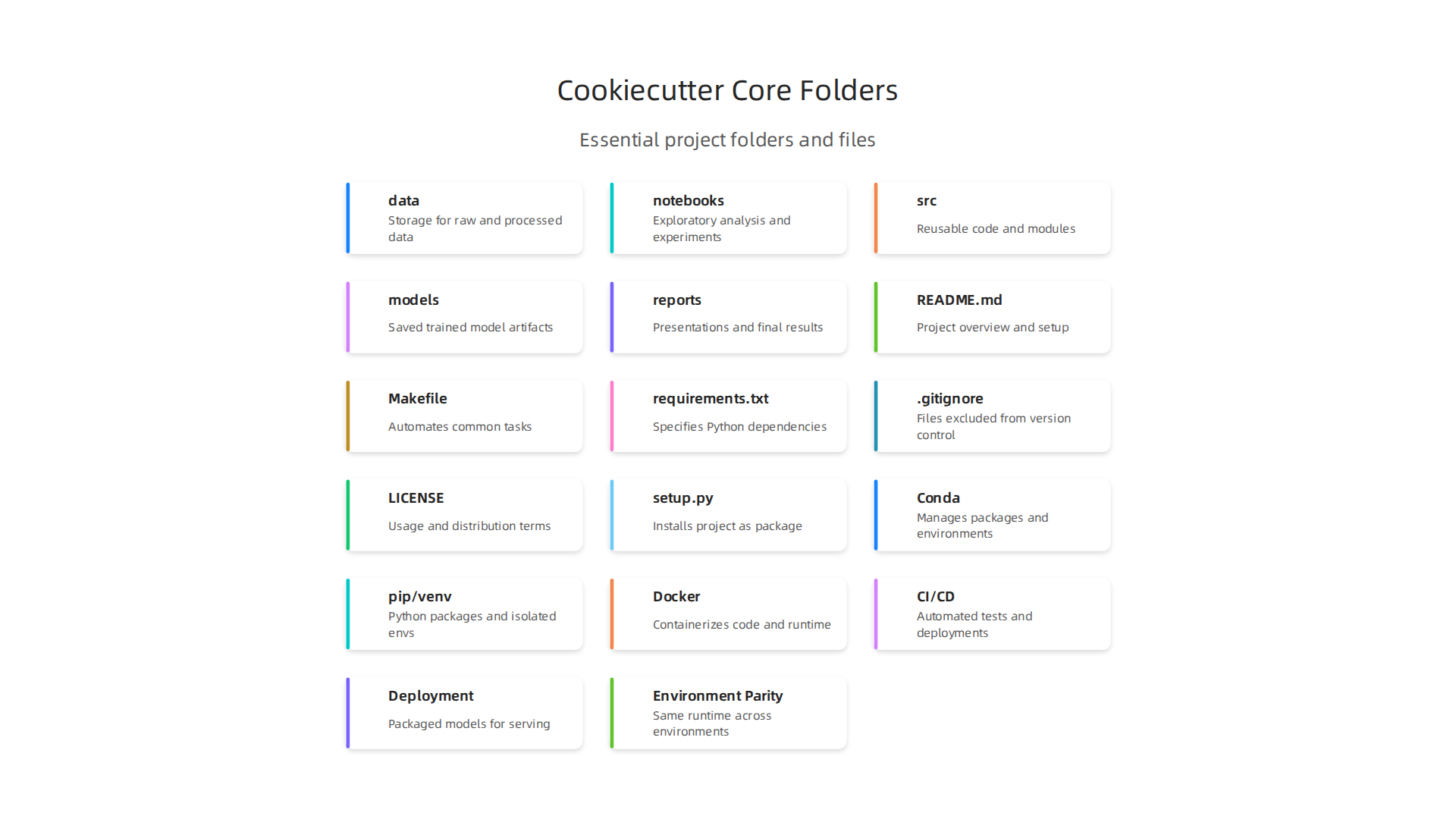
This setup is much like the organized projects you might see on an MIT data science GitHub page, helping you keep everything tidy from day one. Let’s look at the main folders and what they are for.
Imagine your project as a house. Each room has a clear purpose.
data/
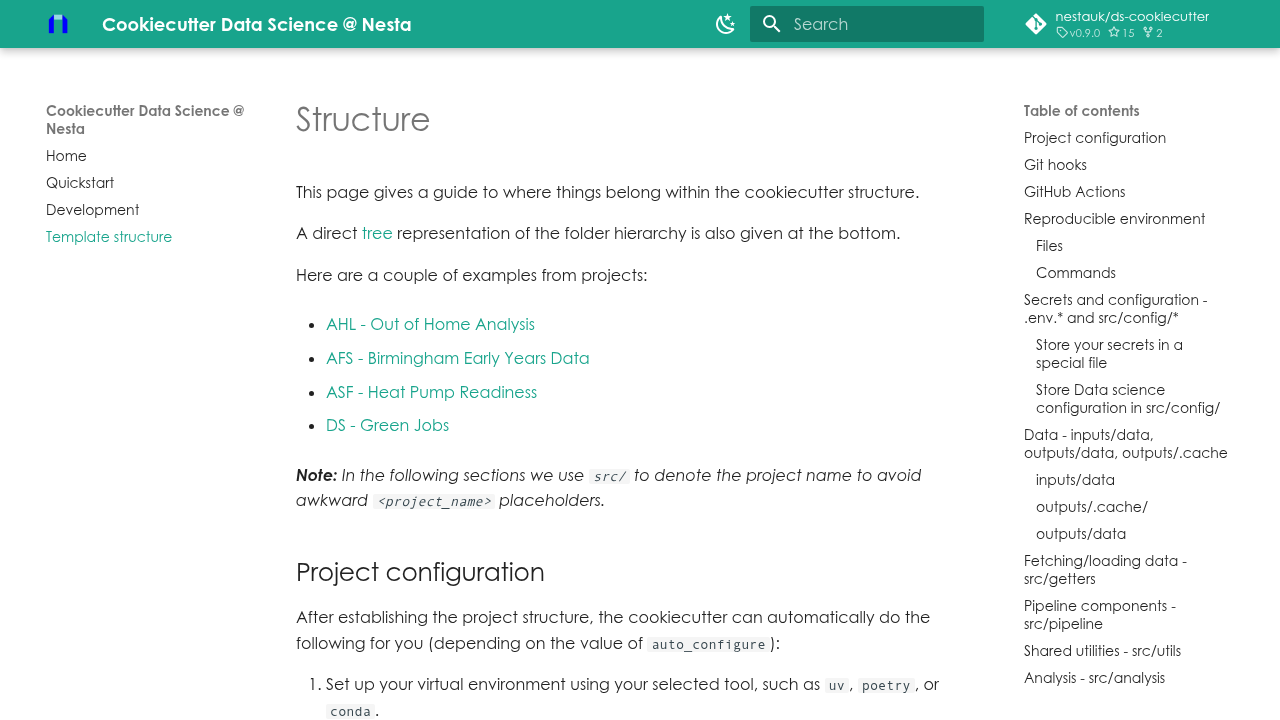
This is your main storage for all things data. Inside, you’ll find even more folders to keep things super organized, a practice recommended for good project management Generic Folder Structure for your Machine Learning Projects.raw/: This is where your original, untouched data goes. Think of it as your precious untouched ingredients. You should never change files in this folder.interim/: Here, you put data that’s been partly cleaned or changed. It’s like the ingredients you’ve chopped but haven’t mixed yet.processed/: This folder holds the final, clean datasets ready to be used fordata modelingor training your machines. This is your perfectly prepared meal.external/: If you bring in data from outside sources, like public datasets, they go here.
It’s important to remember that you usually don’t save very large data files in version control systems like Git. Instead, you might use other tools to manage them Template structure – Cookiecutter Data Science @ Nesta.
-
notebooks/
This folder is for your Jupyter notebooks or similar files. These are great for trying out new ideas, exploring data, or showing quick results. But, the main code that runs your project should not live here. Keep it separate to make your project easier to follow What’s the Best Way to Structure a Data Science Project Professionally?. Notebooks are fantastic for Exploratory Data Analysis Techniques for Machine Learning in 2026, helping you understand your data better. -
src/
This folder, often also named after your project, is for all the important, reusable pieces of code. This includes your Python scripts (.pyfiles) that clean data, train models, or do other key tasks. It’s the "engine room" of your project. By keeping your main code here, it becomes easier to test, share, and reuse. Learning to Master your Python stack for data science in 2026 is very helpful for this part of your project. -
models/
Once you train a machine learning model, you save it. This is the place for those saved models. Having a special spot for them helps you keep track of different versions or experiments AI/ML Project Standard Folder Structure. -
reports/
This folder is where you put the final results of your hard work. This might include:figures/: Important charts or graphs.presentations/: Slides you make to share your findings.documents/: Written reports or papers.
Having all your project outputs in one place makes it easy to share with others or even present in tools likeData Studio.
This clear structure from cookiecutter data science makes sure that anyone picking up your project, including future you, knows exactly where everything is. It’s a simple way to make complex data science work much more manageable and reliable.
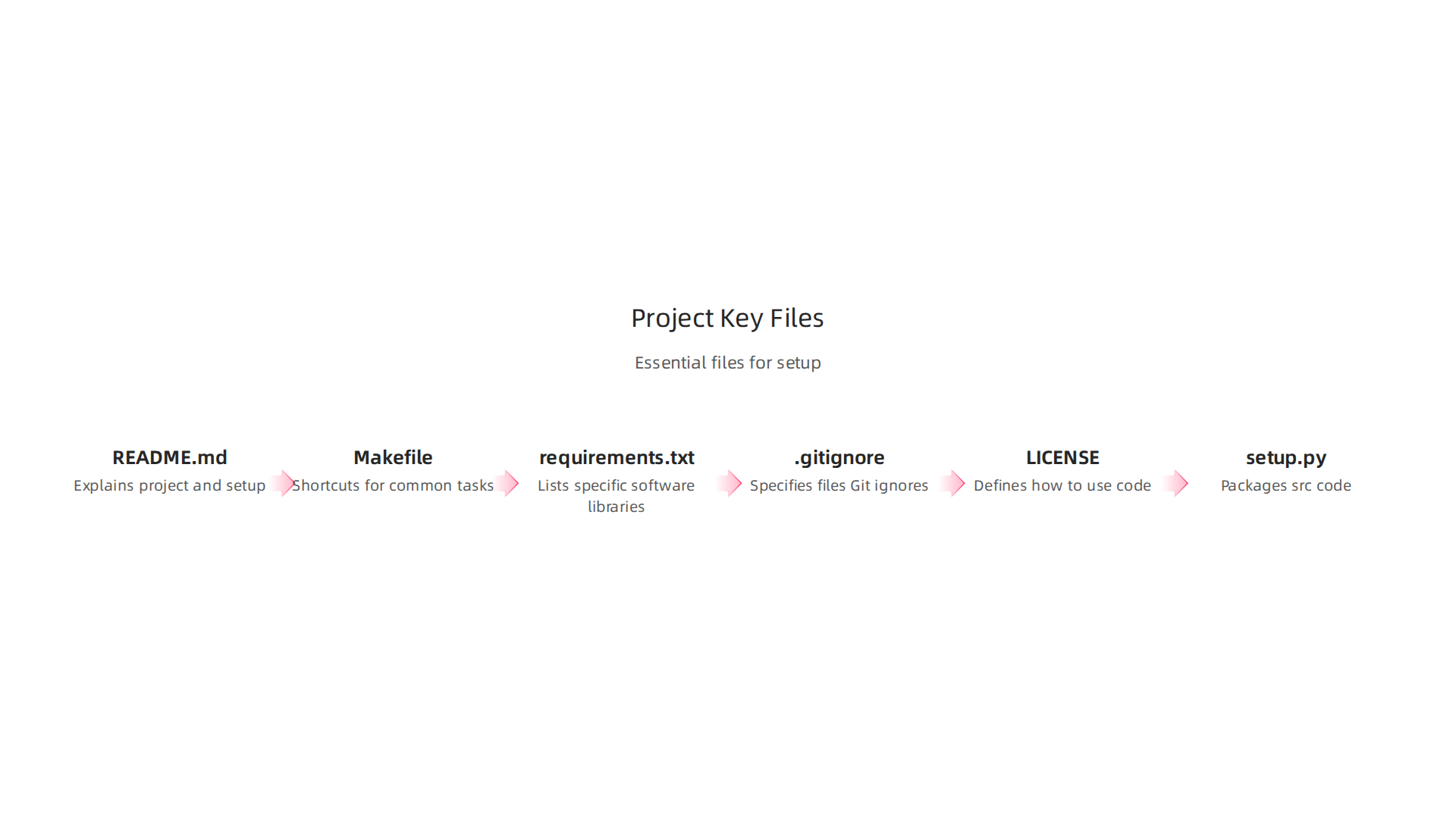
The cookiecutter data science project is more than just a set of folders. It also includes several important files that act like a quick guide for anyone working on the project.
Think of these as the instruction manual and tools that come with your organized house.
Here are some key files you’ll find and why they matter:
-
README.md: This is like the front door sign for your project. It’s a text file that explains what the project is about, how to set it up, and how to run it. A goodREADMEmakes it easy for others (and future you!) to understand and use the project right away. You can find examples of this in the general overview of Cookiecutter Data Science. -
Makefile: This file contains shortcuts for common tasks. Instead of typing long commands, you might just typemake datato download or prepare your data, ormake trainto run your model training code. It helps automate parts of your workflow, making tasks faster and less error-prone. -
requirements.txtorenvironment.yml: These files list all the specific software libraries your project needs to run. This is super important because it ensures that everyone using the project has the exact same setup, preventing issues where code works on one computer but not another. It’s key for creating reliable machine learning systems. -
.gitignore: This special file tells tools like Git which files to ignore and not save in your project’s history. This is often used for large data files, temporary files, or sensitive information you don’t want to share or track. -
LICENSE: This file tells people how they are allowed to use your project’s code. It’s important for sharing your work, especially if you plan to make it public. -
setup.py: If you want to turn yoursrc/folder code into a reusable Python package, this file helps you do that. This makes it easier to import your custom functions and tools into other parts of your project or even different projects.
Making the template your own
One of the best things about cookiecutter data science is how much you can change it to fit your team’s needs.

When you first use cookiecutter to start a new project, it asks you a few questions. These are called cookiecutter prompts.
For example, it might ask for your project’s name, your name, or a short description. These answers then fill in parts of the new project files, making it instantly personalized. You can learn more about how to set up a new project structure with these prompts in guides like How to Spin Up a Project Structure with Cookiecutter.
Under the hood, these questions come from a special file inside the template itself, often called cookiecutter.json. This file holds all the default settings and questions that cookiecutter uses.
Teams often take the basic cookiecutter data science template and change it to fit their own ways of working. This might mean:
- Adding specific tools or libraries they always use.
- Changing the folder names to match internal company rules. Actually, in newer versions of the template, the
srcfolder is often renamed to match the project name, which is a common customization Cookiecutter Data Science V2 – DrivenData. - Including special scripts for testing or deployment.
You can even create your own custom cookiecutter templates from scratch or by modifying existing ones. This allows companies to make sure every new data science project starts with the same best practices and tools already built-in, helping them optimize your machine learning workflow to cut bottlenecks and speed up model delivery. This flexibility is why cookiecutter data science is so powerful for building projects that are ready for serious work. If you want to make bigger changes or build your own template, there are resources like Creating custom reusable project templates that can walk you through the steps.
Standards for data, code, experiments, and artifacts
After you set up your cookiecutter data science project and make it your own, the next big step is to agree on how everyone will work inside it. This means setting clear rules for how you handle your data, write your code, run your experiments, and save your important project pieces. Having these standards makes sure your work is easy to understand, share, and repeat.
How to handle your data
In a good cookiecutter data science project, data is split into different groups. This helps keep things neat and clear:
data/raw: This is where your first, untouched data goes. Think of it as the original photos. You should never change files in this folder. It keeps a perfect record of what you started with.data/interim: Here, you store data that has been cleaned or changed a little bit. It’s like having edited photos before you make them into a final album.data/processed: This folder holds the final, ready-to-use data for your models. This data has been prepared perfectly for your specific task, like creating a special dataset for data modeling.data/external: Sometimes you use data from other places, like public datasets. Those go here.
You can see an example of this kind of setup in a guide for standard folder structure for AI/ML projects.
When it comes to saving your data, a common rule is not to put big data files into Git, which is what you use to track changes in your code. Large files can slow Git down. Instead, it’s better to use other ways to store your data, such as cloud storage like Amazon S3. This helps manage your data more easily and efficiently, as explained in the template structure for Cookiecutter Data Science. Good data systems are very important for successful projects, helping why enterprise data systems are the backbone of ai success.
Rules for code and results
Just like with data, there are good ways to set up your code and experiments.
- Code organization: Most of your main code, like the Python scripts that do the heavy lifting, should live in a
src/folder (or a folder named after your project). This keeps your important code separate from other files. - Notebooks: Files like Jupyter notebooks are great for trying out new ideas or showing your results. But for the main, working part of your project, it’s often better to put the important logic into
.pyfiles in yoursrc/folder. This helps make your project more professional and easier to manage, a point often discussed when asking what’s the best way to structure a data science project professionally. - Reproducible scripts: Your project should be set up so that anyone can run your code and get the same results. This means your scripts need to be clear and follow a logical order. You can use your
Makefile(which we talked about earlier) to create simple commands for these steps. Being able to reliably run python code in production for machine learning systems is a key goal. - Model artifacts: When you train a machine learning model, the final saved model is called a model artifact. These trained models should be stored in a special
models/folder. This makes it easy to find them and use them later, or share them with others.
Making sure your code runs the same way every time is super important. This means that if you give your project to someone else, they should get the exact same results you did.

This is called making your work "reproducible." To do this, you need good tools to handle what your project needs to run.
Tools for keeping things the same
In a cookiecutter data science project, you use special tools to set up your project’s environment. Think of an environment as a special box that holds all the exact software and libraries your code needs.
Here are some common tools that help make sure your project always runs correctly:
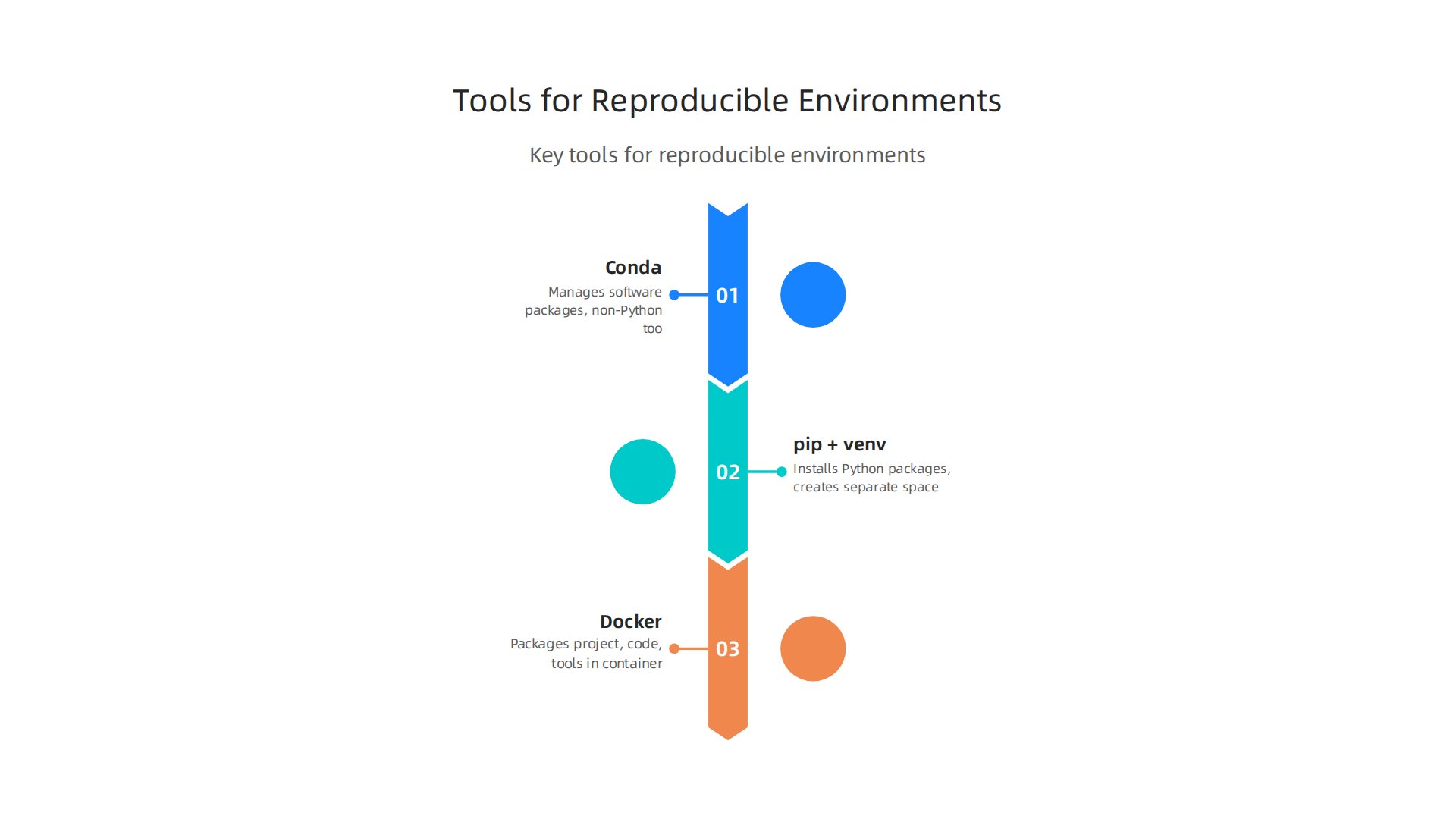
- Conda: This tool helps manage all the different software packages your project uses, not just Python ones. It’s great because it can handle many kinds of libraries, including ones that aren’t written in Python. You can describe all the tools your project needs in a file called
conda.yamlorenvironment.yml. Using Conda helps define very exact environments for your projects, making them reproducible Reproducible Projects: Defining Conda and Docker Environments in MLflow. - pip + venv: These are often used together for Python projects.
piphelps install Python packages, andvenv(short for virtual environment) creates a separate space for your project’s Python tools. This stops your project’s tools from mixing with other Python projects on your computer. Many people likevirtualenvfor making sure environments are the same every time you run your project Is there any reasons why virtualenv is the recommended tool for …. - Docker: Imagine a shipping container for your software. Docker puts your entire project, including its code, tools, and environment settings, into one tidy package. This package is called a container. It means your project will run the exact same way on any computer that has Docker, because everything it needs is inside that container. Docker often works with Conda to manage complex machine learning project needs Managing Python Dependencies with Conda in Docker.
These tools let you "pin" or lock down the exact versions of all the software your project uses. This is important because if you use version 1.0 of a tool today, and someone else uses version 2.0 next year, they might get different results. Pinning versions ensures everyone uses the same tools.
When you start a new cookiecutter data science project, you often find special scripts that help set up these environments for you. These "bootstrapping" scripts quickly get your workspace ready, installing all the right tools. You can also use them with "CI hooks," which are like automated checks that make sure everything is set up correctly every time new code is added to the project. This makes sure your data modeling or any other part of your process always has the right tools to run.
Staying updated with the latest in machine learning tools and best practices is a continuous journey. You can learn more about managing your Python setup for data science by reading our guide on how to master your Python stack for data science in 2026.
Keep your knowledge sharp with the latest in AI.
Get clear daily AI updates from The AI Newsletter Worth Reading.
Moving your project from an idea to something everyone can use is a big step. This is where MLOps patterns come in handy. MLOps is like a playbook for how to build, test, and release machine learning models smoothly and reliably. A cookiecutter data science template sets up your project in a way that makes MLOps much easier.
MLOps Patterns That Fit a Template
The way a cookiecutter data science project is set up helps you follow key MLOps practices right from the start.
-
Continuous Integration/Continuous Deployment (CI/CD) for Models: Think of CI/CD as an automated assembly line. When you use a template, your project often has special scripts and tests ready to go.
- CI (Continuous Integration): This means that every time you make a change to your code, automated tests run to make sure you haven’t broken anything. For machine learning, this could mean checking if your data processing still works, or if your model still trains without errors. The "CI hooks" we talked about earlier are a big part of this, helping to automatically check your
data modelingprocess. - CD (Continuous Deployment): If all the tests pass, your code can be automatically prepared for use. This could mean updating a model that’s already running, or getting a new one ready. A well-structured template gives you a solid base for these automated steps.
Many MLOps tools, like MLflow, help with making these processes smooth and clear, tracking everything that happens with your models and experiments to ensure you create a reproducible and maintainable system.
- CI (Continuous Integration): This means that every time you make a change to your code, automated tests run to make sure you haven’t broken anything. For machine learning, this could mean checking if your data processing still works, or if your model still trains without errors. The "CI hooks" we talked about earlier are a big part of this, helping to automatically check your
-
Deployment Artifacts: When your model is ready to be used, it becomes a "deployment artifact." This is like a finished product that’s packaged up.
- Because
cookiecutter data sciencetemplates often include Docker setups, your project, with all its tools and code, can be put into a tidy container. This container is your deployment artifact. It ensures that your model runs the same way, no matter where it’s deployed. This is key for things like making sure your Python code runs reliably in production for machine learning systems.
- Because
-
Environment Parity: This means that the environment where you build your model (your computer) is the exact same as the environment where it runs in the real world (production). The tools like Conda and Docker, as discussed before, are crucial here. They let you "lock" the versions of all your software, making sure there are no surprises when you move your project from your laptop to a server. This is a core part of MLOps for tracking and reproducing work, as explained in an AI Compendium on Experiment Tracking & Reproducibility.
When to Extend the Template
While a cookiecutter data science template gives you a great start, larger or more complex projects might need extra tools for MLOps.
- Model Serving: This is about how your model actually "serves" predictions to users or other programs. The template usually doesn’t include a direct way to do this. You might add tools like Flask, FastAPI, or cloud-specific services to turn your model into a live service that can answer questions.
- Feature Stores: Imagine all the special bits of information (features) your model uses. A feature store is a central place to keep these features, making sure they are always fresh and consistent for both training and serving your models. This helps keep your
data modelingconsistent. - Model Registries: As you make more models and new versions of them, it’s easy to get lost. A model registry is like a library for your models. It helps you keep track of all your models, their versions, and important details about them. Tools like MLflow often include model registry features, as noted in this introduction to MLflow Pipelines.
By understanding these MLOps patterns, you can use a cookiecutter data science template not just for starting your project, but as a stepping stone to building reliable and well-managed machine learning systems. Many teams, including those in the MIT data science GitHub community, share templates and ideas that show these MLOps principles in action. This helps optimize your machine learning workflow to cut bottlenecks and speed up model delivery.
Testing, validation, and monitoring: building quality into the structure
To make sure your machine learning project works well and stays useful, you need to build in ways to check its quality. This means testing your code, making sure your data is good, and keeping an eye on your model after it’s running. A cookiecutter data science template helps you set up these important quality steps from the very beginning.
Here’s how these quality checks fit into a well-structured project:
-
Unit Tests: These are like quick, small checks for tiny parts of your code. For example, if you have a piece of code that changes numbers from one type to another, a unit test makes sure that specific piece works just right every time. The template usually sets up a place for these tests, making it easy to add them as you go.
-
Data Validation Checks: Before your machine learning model can learn from data, you need to make sure that data is correct and clean. This is crucial for strong
data modeling. Imagine if your data had wrong dates or missing values; your model might not learn correctly. Acookiecutter data scienceproject often includes steps to add checks that look at your data’s shape, type, and values to catch problems early. These checks help ensure your data meets expected rules, much like using Python dataclass for data validation and faster machine learning pipelines. -
Experiment Reproducibility Tests: This means that if you run your experiment again with the same code and data, you should get the same results. This is super important for trust and fixing problems. Tools like Conda and Docker, which we discussed earlier, help create a "locked" environment. This environment ensures all your software versions are the same, so your experiments can be rerun and show the same outcome. MLflow also helps here by letting you define these clear environments for reproducible projects, as shown in resources like Day 26: Reproducible Projects: Defining Conda and Docker Environments in MLflow and when managing Python dependencies with Conda in Docker.
-
Monitoring Hooks and Logging Expectations: Once your model is out there and working, you need to know if it’s still doing a good job. The
cookiecutter data sciencetemplate provides a good structure for adding "monitoring hooks." These are like little sensors that tell you how the model is performing in the real world. You can set up your model to log important details, such as how many predictions it makes, if it sees unusual data, or if it experiences any errors. This logging data helps you watch your model and react quickly if something goes wrong, ensuring quality over time.
Mini case study: adapting a cookiecutter template in a mid-size ML team
After understanding how important good structure is for machine learning projects, let’s look at how a real team might use it. Picture a mid-size company in 2026 with a team of about 15 machine learning pros. They wanted to make their work smoother and clearer. Their main goal was to make sure every new project started the same way, so everyone could easily understand and jump into each other’s work. They also hoped to onboard new team members faster and make sure all projects followed the same high quality standards.
They decided to use a cookiecutter data science template as their starting point. This template gave them a basic setup, much like what you’d find on platforms like GitHub for data science projects. But they didn’t just use it as is. They changed it a bit to fit their team’s specific needs. For example, they added their own special folders for very sensitive data and put in some scripts they often use for cleaning data. They also made sure their setup could easily connect with their tools for showing data, like Google Data Studio, which helped them see results more clearly.
One big win was that all new projects instantly had a good structure for data modeling. This meant data was always set up in a clear way, making it easier for everyone to work with. However, it wasn’t all easy. A common problem they faced was getting everyone used to the new way of doing things. Some team members were used to their old habits. This showed them that training and clear talks about "why" they were changing were super important. They learned that standardizing project templates with tools like cookiecutter data science helps a lot, but you also need to guide your team through the changes for it to truly work well

Standardizing project templates with Cookiecutter. This way, everyone can quickly master their Python stack for data science in 2026 and work together more effectively.
Practical resources: templates, checklists, and starter scripts
To work effectively and keep projects organized, teams need helpful tools and guides. These are often called practical resources. They make sure everyone on a team starts projects the same way, which helps everyone understand the work better.
Here are some important types of resources to gather:
- Starter Project Templates: These are like ready-made project folders. A good example is the
cookiecutter data sciencetemplate, which sets up your project files and folders in a standard way right from the start. This saves time and ensures a clear structure fordata modeling. You can find many such templates on platforms like GitHub, often shared by research groups like those working onMIT data science GitHubprojects. These templates make it easy to begin a new data science project following best practices How to start a data science project using Cookiecutter. - Continuous Integration (CI) Templates: These are special setups that help automate tasks. For example, they can automatically check your code for errors or run tests every time someone makes a change. This helps catch mistakes early and keeps the project running smoothly.
- Reproducibility Checklists: These are lists of steps to make sure your project can be run by anyone else and get the same results. This is very important for sharing your work and making sure it’s reliable. For instance, the govcookiecutter template for data science projects often includes these kinds of checks.
When choosing a template, think about your team’s experience. If your team is new to setting up projects in a standard way, a simple cookiecutter data science template is a great start. More experienced teams can pick a template and then change it to fit their special needs. The main goal is to pick something that makes your projects clear and easy to work with. A good template makes it easier to keep track of your data modeling and connect your results to tools like Data Studio for clear viewing.
Picking the right resources and knowing how to use them can make a big difference in how well your team works together. For more insights on selecting tools that enhance your workflow, explore how to choose the Data Analysis Tools 2026 Choosing The Right Platform For ML Teams.
Staying up to date with the latest trends and tools is crucial for any machine learning professional. Get clear daily AI updates from The AI Newsletter Worth Reading.
Summary
This article explains how the Cookiecutter Data Science template gives data teams a consistent, practical project skeleton that reduces brittle experiments and improves reproducibility. It walks through the core folders (data/raw, interim, processed, external; notebooks; src; models; reports) and the key files (README, Makefile, requirements/environment, .gitignore, LICENSE, setup.py) so you know where to put data, code, and outputs. The piece covers how to customize the template with cookiecutter prompts, enforce standards for data and code, and use environment tools (Conda, pip/venv, Docker) to pin dependencies. It also shows how the template supports MLOps patterns—CI/CD, deployment artifacts, and environment parity—and why testing, data validation, and monitoring hooks are essential. Finally, it offers a mini case study and practical resource types (starter templates, CI templates, reproducibility checklists) so teams can adopt, adapt, and scale the template effectively.