
Python Range Function: Efficient Looping, Memory Savings, Error Prevention

The python range function is a simple but very important tool for anyone writing code, especially for engineers and researchers in 2026. Think of it like a clever helper that gives you a sequence of numbers, one by one, when you need them. It is at the heart of how Python programs repeat tasks.
At its most basic, the python range function helps your code do something a certain number of times. For example, if you want to count from 0 to 9, you would use range(10). This gives you numbers starting from 0, going up by 1, and stopping before 10. You can also tell it where to start and what steps to take. For instance, range(2, 10, 2) would give you 2, 4, 6, 8. This way of controlling loops is a core part of Python programming, deeply tied to how things like for loops work to create powerful programs, as described in The Python Language Reference.
Actually, range() does not make a full list of numbers right away. Instead, it creates them as they are needed. This is called "lazy evaluation," and it is a smart way to save computer memory, especially when you are dealing with many numbers. It is also important to remember that range() creates an immutable sequence of numbers, meaning once it is made, you cannot change the numbers in it directly, as explained by Python range() built-in function – Python Cheatsheet.
While useful, there are some common mistakes people make. A big one is forgetting that the stop number you give range() is never included in the sequence.
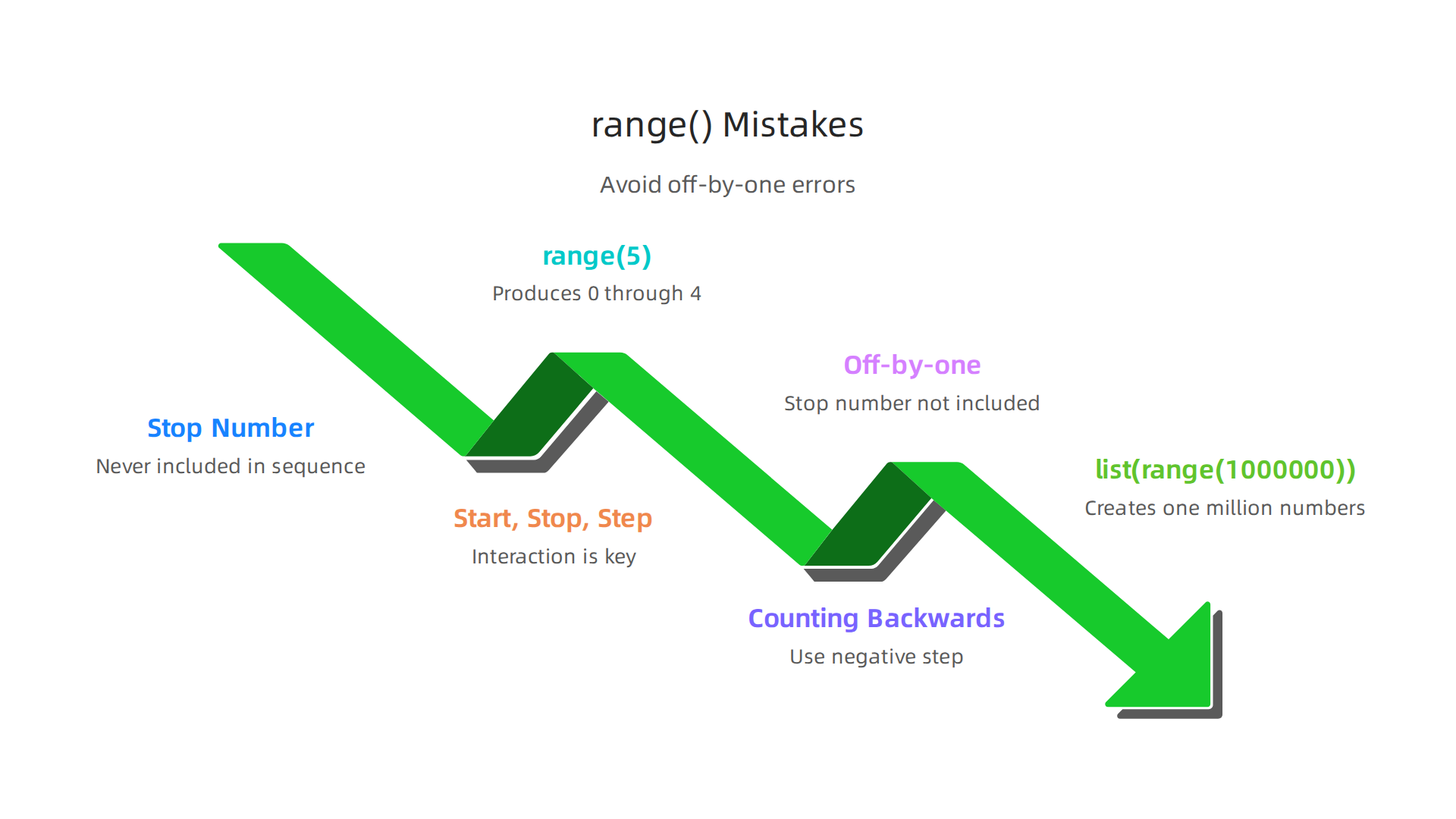
So, range(5) gives you 0, 1, 2, 3, 4, but not 5. Forgetting this can lead to small errors in your code. Also, understanding how the start, stop, and step values work together is key to avoiding unexpected results. Missing these details can cause problems in bigger projects, like those in machine learning where correct loops are vital for handling large amounts of data.

Getting your python range function usage right is a fundamental step in building reliable systems, and you can learn more about general Python data handling in our guide on Mastering Python Data Workflows for Peak Performance.
Learning to use the python range function well helps you write cleaner, more effective code. It prevents small bugs that can grow into bigger problems when you are working on complex tasks.
Want to stay informed on how these core programming skills connect to the broader world of AI and machine learning?
The AI Newsletter Worth Reading
Moving from the general idea, let’s dive into the core details of the python range function. Knowing its structure helps you use it without unexpected surprises.
range() basics: signature, return type, and lazy evaluation
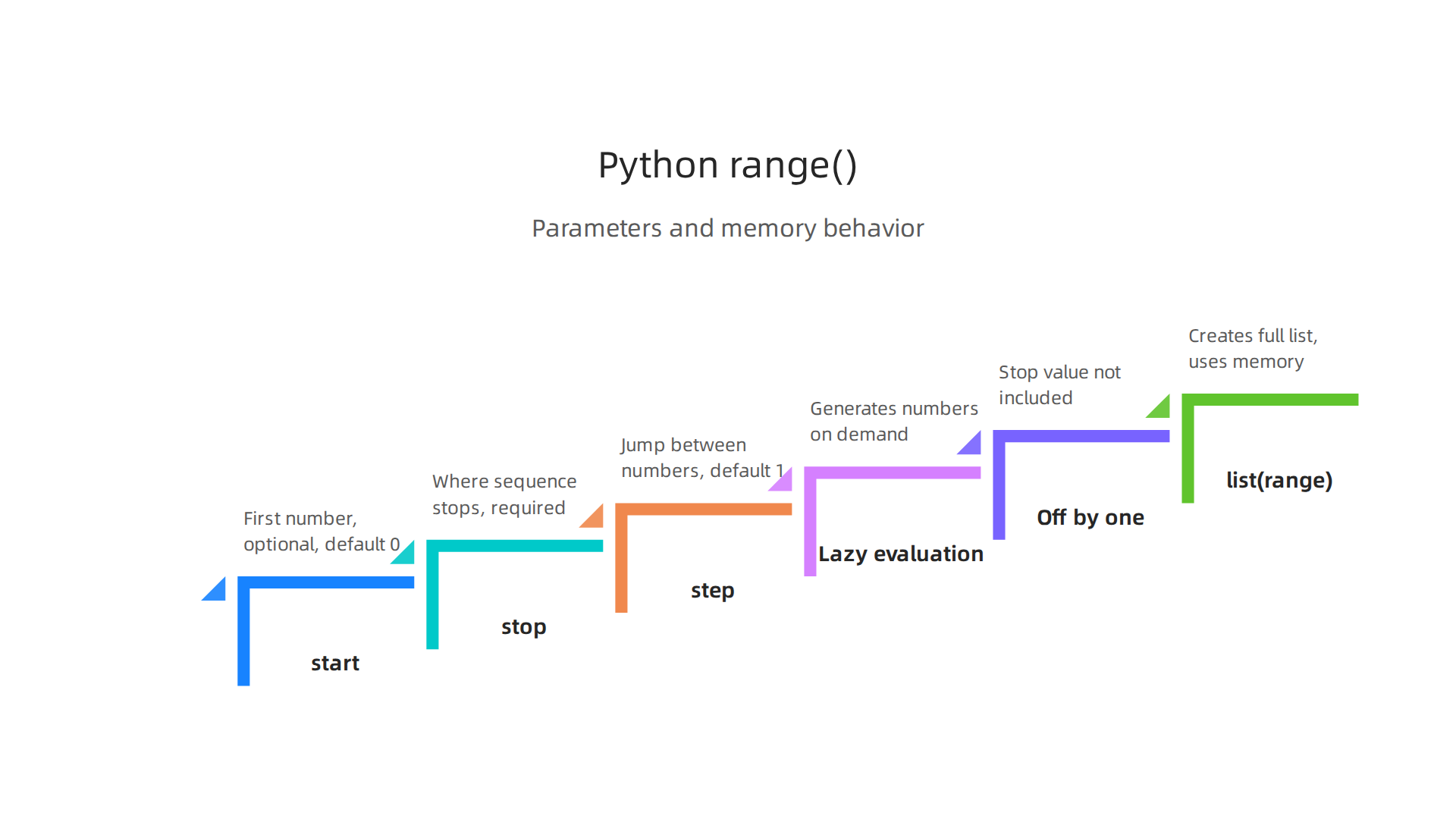
The python range function has a special way it is set up, often called its "signature." This signature tells you what kinds of information you can give it. It looks like this: range(start, stop[, step]).
Let’s break down these parts:
start: This is the first number in your sequence. It is optional. If you do not provide it,range()will start from 0 by default.stop: This is the number where the sequence stops. It is very important and always needed. Remember, the number you put here is never included in the sequence. For example,range(5)stops before 5, giving you 0, 1, 2, 3, 4.step: This tellsrange()how much to jump between each number. It is also optional. If you do not set it,range()will increase by 1 each time. For instance,range(2, 10, 2)starts at 2, stops before 10, and jumps by 2, giving you 2, 4, 6, 8. You can even use a negativestepto count backwards, likerange(10, 0, -1)to get 10, 9, 8, and so on.
The official Python documentation and sources like Python range() Function describe these parameters, helping you to correctly define your number sequences for for loops or other programming needs.
For example, if you need to use an if statement python to check if a number falls within a generated range, understanding these parameters is key.
When you use the python range function, it does not give you a list of numbers right away. Instead, it returns a special kind of object called a range object. This range object is a type of "immutable sequence" of numbers, meaning you cannot change it after it’s created. This is a very smart way Python saves computer memory. Instead of making a huge list of numbers all at once, range() creates each number only as your program needs it. This is what we call "lazy evaluation."
This "lazy" nature is a big deal, especially in 2026, when programmers often work with very large sets of data in areas like machine learning. If range() created full lists, it could quickly use up all your computer’s memory.

Because it creates numbers on the fly, it’s very efficient. As explained by Python range, this built-in function is commonly used for repeating actions a specific number of times in loops. Understanding fundamental structures like the range type is crucial for building efficient programs, just as understanding all why python data types are the foundation of data science is important for any data professional.
The python range function is super handy for making your programs do things many times. Since we know how range() works by only making numbers when they are needed, let’s look at common ways people use it.
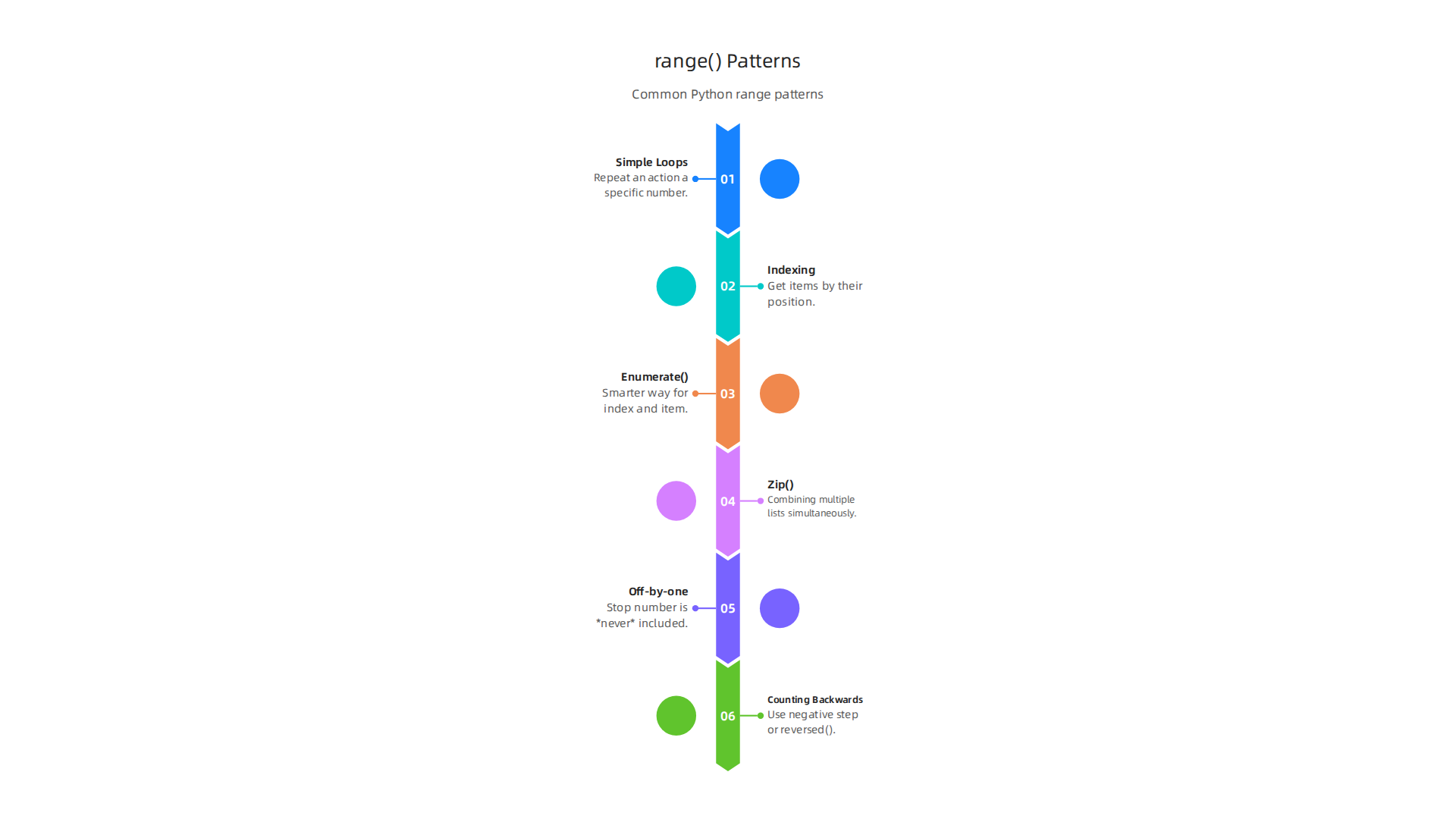
Common ways to use range()
Many times, you need to do something a specific number of times. This is where range() shines.
1. Simple Loops:
The most basic use is in a for loop to repeat an action.
for i in range(5):
    print(i)
This code will print the numbers 0, 1, 2, 3, and 4. Remember, range(5) stops before 5.
2. Getting items by their number (indexing):
Sometimes you have a list of things and you want to look at each item by its position. range() can help you get these positions, also called indexes.
my_fruits = ['apple', 'banana', 'cherry']
for i in range(len(my_fruits)):
    print(f"Fruit number {i} is {my_fruits[i]}")
Here, len(my_fruits) gives you the total number of fruits, which is 3. So, range(len(my_fruits)) becomes range(3), giving you numbers 0, 1, and 2. This lets you access my_fruits[0], my_fruits[1], and my_fruits[2]. You can even use an if statement python inside the loop to check for certain fruits or conditions.
3. A smarter way: enumerate()
While range(len()) works, Python has an even better way to get both the item’s number and the item itself. It’s called enumerate(). It’s often easier to read and less prone to mistakes. Many Python experts suggest using enumerate() instead of range(len()) for better code.
my_fruits = ['apple', 'banana', 'cherry']
for index, fruit in enumerate(my_fruits):
    print(f"Fruit number {index} is {fruit}")
This does the same thing as the example above but looks cleaner. You can learn more about why enumerate is often preferred over range(len()) in discussions like range(len(s)) vs enumerate?.
4. Combining lists with zip()
What if you have two lists and want to go through them at the same time, pairing up items? That’s when zip() is useful.
names = ['Alice', 'Bob', 'Charlie']
scores = [90, 85, 92]
for name, score in zip(names, scores):
    print(f"{name} got a score of {score}")
Here, zip() connects Alice with 90, Bob with 85, and so on. You don’t directly use the python range function here, but it’s another common way to loop through data.
5. Watching out for "off-by-one" mistakes
One very common mistake when using range() is called an "off-by-one" error. This happens because the stop number in range(start, stop) is never included.
For example, range(5) gives you 0, 1, 2, 3, 4. It does not include 5. If you wanted numbers up to and including 5, you would need range(6). If you are new to programming, keeping track of this can be tricky. Always double-check your start and stop numbers to make sure your sequence includes exactly what you want.

Understanding how range creates numerical sequences is key for efficient Python programming, as discussed in range () in Python 2026: Efficient Sequence Generation.
6. Counting backwards
You can also make the python range function count backwards by using a negative "step."
for i in range(5, 0, -1):
    print(i)
This code would print 5, 4, 3, 2, 1. The start is 5, the stop is 0 (so it stops before 0), and the step is -1.
Another way to count backwards is to use the reversed() function. This function can take a range object and give you the numbers in reverse order. The reversed() | Python’s Built-in Functions explanation shows how useful this is.
for i in reversed(range(5)):
    print(i)
This would print 4, 3, 2, 1, 0. Both ways are good, depending on what feels clearer for your program.
Staying updated with these practical patterns and general advancements in technology is crucial for developers today.
Get clear daily AI updates from The AI Newsletter Worth Reading.
Performance and memory: range() vs list(range()) and alternatives
Now that we’ve seen cool ways to use the python range function, let’s talk about how it works with your computer’s memory and speed. This is important, especially when you’re dealing with lots and lots of numbers, like in machine learning projects.
Imagine you need a list of numbers from 0 to 1 million.
If you use range(1000000), Python is smart. It doesn’t make a list of all one million numbers right away. Instead, it just remembers three things: where to start (0), where to stop (1,000,000), and how to count (by 1). It only makes a number when your program asks for it. This means range() uses very little memory, no matter how big the numbers get. It’s like having a recipe for a cake instead of baking the whole cake if nobody is going to eat it yet.
But if you write list(range(1000000)), you’re telling Python, "Hey, make ALL those one million numbers right now and put them into a list in my computer’s memory!" This will use a lot more memory and take more time to create. It’s like baking a huge cake and then realizing nobody is coming to the party.
So, for most looping and counting tasks, using range() by itself is better because it’s like a smart number generator that saves memory and works faster when you’re handling many items.
This difference in how memory is used is a key point to understand when comparing range() to list(range()), as some experts explain that range uses very little memory, only storing the start, stop, and step values, while list(range()) stores every single number in the sequence, which takes up much more space for larger number sets [^1].
Alternatives for Special Tasks
Sometimes, you really do need all the numbers stored in a list. Or you might be doing special math, like when working with data science or machine learning.
- When you need a full list: If you specifically need a list of all numbers, then
list(range())is what you’d use. Just be mindful of how big that list will get. numpy.arangefor advanced math: In fields like data science, people often use a tool called NumPy. It has a function calledarangethat is similar to thepython range functionbut works with special NumPy number lists. These are great for fast math operations. If you’re building systems, understanding how to handle data efficiently, like when you need to make fast choices with anif statement python, can really speed things up. To learn more about how Python handles data for speed, you might want to explore articles on mastering Python data workflows.

- Generators: The
python range functionacts a bit like a "generator." Generators are special functions that also make numbers one by one, only when they are asked for. They are very memory-friendly for creating sequences that are too large to fit in memory all at once. For instance, if you were building a system to compute theabsolute value pythonfor millions of numbers, a generator would be a good choice. Similarly, handling text data might involve apython split stringoperation or usingpython argparsefor command-line tools, where memory efficiency can also be key.
In short, range() is usually your best friend for loops because it’s memory-smart. If you need all the numbers at once or special math tools, then other options like list(range()) or numpy.arange come into play. Staying up to date with the latest advancements in AI and technology can give you insights into how these foundational concepts are applied in cutting-edge ways.
Get clear daily AI updates from The AI Newsletter Worth Reading.
[^1]: Based on information from "【小白笔记】Python 中range 和list(range()) 的区别原创" (https://blog.csdn.net/weixin_70325224/article/details/154043960) and "Range vs List Performance" (https://pythonexamples.org/python-range-vs-list-performance/).## Performance and memory: range() vs list(range()) and alternatives
Now that we’ve seen cool ways to use the python range function, let’s talk about how it works with your computer’s memory and speed. This is important, especially when you’re dealing with lots and lots of numbers, like in machine learning projects.
Imagine you need a list of numbers from 0 to 1 million.
If you use range(1000000), Python is smart. It doesn’t make a list of all one million numbers right away. Instead, it just remembers three things: where to start (0), where to stop (1,000,000), and how to count (by 1). It only makes a number when your program asks for it. This means range() uses very little memory, no matter how big the numbers get. It’s like having a recipe for a cake instead of baking the whole cake if nobody is going to eat it yet.
But if you write list(range(1000000)), you’re telling Python, "Hey, make ALL those one million numbers right now and put them into a list in my computer’s memory!" This will use a lot more memory and take more time to create. It’s like baking a huge cake and then realizing nobody is coming to the party.
So, for most looping and counting tasks, using range() by itself is better because it’s like a smart number generator that saves memory and works faster when you’re handling many items. This difference in how memory is used is a key point to understand when comparing range() to list(range()). range() uses very little memory because it only stores the start, stop, and step values. On the other hand, list(range()) stores every single number in the sequence, which takes up much more space for larger number sets [^1].
Alternatives for Special Tasks
Sometimes, you really do need all the numbers stored in a list. Or you might be doing special math, like when working with data science or machine learning.
- When you need a full list: If you specifically need a list of all numbers, then
list(range())is what you’d use. Just be mindful of how big that list will get. numpy.arangefor advanced math: In fields like data science, people often use a tool called NumPy. It has a function calledarangethat is similar to thepython range functionbut works with special NumPy number lists. These are great for fast math operations. If you’re building systems, understanding how to handle data efficiently, like when you need to make fast choices with anif statement python, can really speed things up. To learn more about how Python handles data for speed, you might want to explore articles on mastering Python data workflows.- Generators: The
python range functionacts a bit like a "generator." Generators are special functions that also make numbers one by one, only when they are asked for. They are very memory-friendly for creating sequences that are too large to fit in memory all at once. For instance, if you were building a system to compute theabsolute value pythonfor millions of numbers, a generator would be a good choice. Similarly, handling text data might involve apython split stringoperation or usingpython argparsefor command-line tools, where memory efficiency can also be key.
In short, range() is usually your best friend for loops because it’s memory-smart. If you need all the numbers at once or special math tools, then other options like list(range()) or numpy.arange come into play. Staying up to date with the latest advancements in AI and technology can give you insights into how these foundational concepts are applied in cutting-edge ways.
Get clear daily AI updates from The AI Newsletter Worth Reading.
[^1]: 【小白笔记】Python 中range 和list(range()) 的区别原创, Range vs List Performance
Advanced techniques: slicing, reversed(), and custom iteration logic
We’ve learned how the python range function saves memory. Now, let’s look at some smart ways to use it for more complex tasks. You can do cool things like picking out parts of a range or counting backwards. This helps you build programs that are more flexible.

Picking Out Parts with Slicing
Think of slicing as cutting a piece from a cake. You can do this with a range() object, even though it doesn’t store all numbers like a list. When you slice a python range function, you don’t get a new list of numbers. Instead, you get another range object that shows the numbers you picked [^1].
Here’s a simple example of slicing:
# Imagine a range from 0 to 10
my_range = range(10) # this is 0, 1, 2, 3, 4, 5, 6, 7, 8, 9

# Get numbers from the 2nd spot up to (but not including) the 7th spot
# This would be 2, 3, 4, 5, 6
sliced_range = my_range[2:7]
print(list(sliced_range)) # Output: [2, 3, 4, 5, 6]
You can even use slicing with a special third number to change how you count. This is called a "step." For example, you can tell Python to count backwards or skip numbers. When you use slicing with range(), it gives you a new range object that starts, stops, and steps as you told it to. Knowing how to work with ranges and other data helps you master Python data analysis tools for machine learning in 2026.
Counting Backwards with reversed()
Sometimes you need to count from a big number down to a small one. The python range function can do this easily with something called reversed(). This is a built-in tool that takes your range and lets you go through it backwards without making a whole new list [^2].
for num in reversed(range(5)):
    print(num)
# Output:
# 4
# 3
# 2
# 1
# 0
This is a clean way to loop in reverse order, which can be useful when you process data from end to start. It works well if you simply need to loop backwards without changing the original sequence [^3].
Custom Steps and Negative Steps
The python range function is very flexible because you can tell it how much to jump between numbers. This is done with the step argument.
-
Positive Step: By default,
range()counts up by 1. But you can change this. If you want to count by 2s or 5s, you can set thestepto 2 or 5.# Count from 0 to 10, skipping by 2s for i in range(0, 10, 2): print(i) # Output: # 0 # 2 # 4 # 6 # 8 -
Negative Step: If you want to count backwards, you can use a negative step. This is like telling Python to go down by a certain amount each time. You must make sure your starting number is bigger than your stopping number when using a negative step [^4].
# Count backwards from 10 down to 1 (stops before 0)
for i in range(10, 0, -1):
    print(i)
# Output:
# 10
# 9
# ...
# 1
Using negative steps can be very handy for tasks like processing text strings in reverse, similar to how you might use python split string to break a sentence into words and then analyze them backward. If you’re building smart systems that make decisions, you might use an if statement python inside these loops to react to different numbers in the sequence. Understanding these ways to use the python range function is a key part of Python for data science and machine learning in 2026 tools and workflows.
By mastering these advanced tricks, you can make your Python programs more powerful and efficient for all sorts of tasks.
Cross-version behavior: Python 2 vs Python 3 and compatibility notes
You’ve learned how the python range function works today. But Python, like many tools, has changed over time. If you ever look at older Python code, especially from Python 2, you might see something different. Understanding these past differences helps you work with all kinds of Python programs.
The Big Change: range() and xrange()
A long time ago, in Python 2, there were two ways to make a sequence of numbers for loops:
range()in Python 2: This function would create a full list of all the numbers in memory. If you asked forrange(1000000), Python 2 would make a list of a million numbers and store them all at once. This could use a lot of computer memory, especially for very big ranges.xrange()in Python 2: This was the smart version. It didn’t make a full list. Instead, it would give you numbers one by one, only when you needed them. This saved a lot of memory and made programs run faster for large loops. People called this "lazy" because it only did work when needed.
Then came Python 3. The people who made Python saw how useful xrange() was for saving memory. So, in Python 3, they decided to get rid of xrange() and make the python range function work just like the old xrange(). This means that today, when you use range(), it’s always memory-efficient. It doesn’t create a full list of numbers; it gives them out as you ask for them How does the Python’s range function work?. This was a big and important change for making Python programs better and faster, especially when dealing with large amounts of data.
Why This Matters for Your Code
This change is why you only see range() in modern Python 3 code in 2026. If you come across old Python 2 code that uses xrange(), you should simply change it to range() when moving it to Python 3. The behavior will be the same as xrange() was, which is exactly what you want for good performance.
For example, if you saw this in Python 2:
# Python 2 code
for i in xrange(10):
    print(i)
You would change it to this in Python 3:
# Python 3 code
for i in range(10):
    print(i)
It looks simpler, and it works better! This move unified how the python range function works, making it easier for everyone to write efficient code without thinking about which version to use. This kind of improvement helps in Mastering Python data workflows for peak performance in any project.
Even though Python 2 is very old now and not supported, understanding its differences helps you appreciate the smart choices made in Python 3. It also prepares you if you ever have to work on older systems. Staying up to date with new tools and best practices is key in today’s fast-moving tech world.
If you’re interested in keeping up with the latest in artificial intelligence and machine learning, you’ll want to read The AI Newsletter Worth Reading.
Using the python range function effectively is just one part of writing good code. To make sure your programs work correctly and stay fast, especially in areas like machine learning, you also need to know about testing and common bugs. Even the smallest mistake in how you count can cause big problems.
Spotting Common Range-Related Bugs: Off-by-One Errors
One of the most frequent mistakes people make when using loops and the python range function is called an "off-by-one error." This happens when your loop runs one time too many or one time too few.
Imagine you want to go through a list of 5 items. If your range() function starts counting from 0 (which Python does) and goes up to, but not including, 5, you’ll get numbers 0, 1, 2, 3, 4. That’s exactly 5 numbers. But if you accidentally set your range() to go up to 4 instead of 5, or if you start from 1, you’ll miss an item or go past the end What is an Off-by-One Error in Python? (Explained for Kids!). These tiny counting mistakes can crash your program or give you wrong results.
For example, if you have a list of items and you want to process each one:
my_list = ['apple', 'banana', 'cherry']
# Incorrect: this loop will not process 'cherry'
for i in range(len(my_list) - 1):
    print(my_list[i])

# Correct: this loop processes all items
for i in range(len(my_list)):
    print(my_list[i])
The small change from len(my_list) - 1 to len(my_list) makes all the difference. Always remember that range(stop) goes up to stop - 1.
How to Test and Prevent Loop Bugs
Catching these bugs early is important. Here are some simple ways:
- Test with Empty Lists: What happens if your list or data has no items? Your code should handle
range(0)without errors. - Test with One Item: If your list has only one item, does your loop still work correctly?
- Test with Edge Cases: Think about the very first and very last number your
python range functionshould create. Do they match what you want? Useprint()inside your loops to see the values as they happen. This can help you debug tricky situations quickly, as shown in this YouTube video on How Can I Fix Off-by-one Errors In My Loop Iterations?.
A great way to prevent these errors is to use unit tests. These are small code pieces that check if your functions work as expected for different inputs. For example, you could write a test that checks if a function using range() returns the correct number of results for a given input size. Unit tests are one of the best AI-powered coding assistants in 2026 recommendations, as they help you make sure your code is reliable.
Smart Coding Practices
Besides testing, following good coding habits helps a lot:
- Be Clear: Make sure your loop conditions are easy to understand. If you’re using
range(len(some_list)), it’s clear you want to go through all items by index. - Use
enumerate: When you need both the item’s position (index) and the item itself,enumerateis safer than usingrange(len(...))and then getting the item by its index. It often avoids off-by-one errors automatically. - Linters and Static Checks: These are tools that look at your code as you write it and point out potential problems, like maybe a
forloop that looks suspicious. They don’t run your code, but they check its structure and style. - Understand
if statement pythonlogic: Many loop errors happen because anif statement pythoninside the loop doesn’t check the right conditions, leading to unexpected behavior. Pay close attention to these conditions.
By focusing on clear code, good testing, and using tools to help you, you can avoid many common bugs related to the python range function and build more robust machine learning models and applications.
Summary
This article explains the Python range function—the simple but essential tool that generates numeric sequences for loops and iteration. It covers the range() signature (start, stop, step), the important detail that stop is excluded, and how range returns an immutable, lazily evaluated range object rather than a full list. You will learn common uses (basic loops, indexing, enumerate), advanced techniques (slicing, negative steps, reversed()), and performance trade-offs such as when to use list(range()) or numpy.arange. The guide highlights common mistakes like off-by-one errors, offers testing and debugging tips, and explains the Python 2 vs Python 3 compatibility change that made range() memory-efficient. By the end, you’ll understand when range is the best choice, how to avoid loop bugs, and which alternatives to pick for high-performance data work.