Mastering Python Variables to Build Reliable ML Systems

Why mastering Python variables matters for ML engineers
If you work with machine learning (ML) today, you know that Python is a super important tool. It’s used for almost everything, from looking at data to building smart AI models. But to use Python well, especially for complex ML tasks, you need to truly understand python variables. Think of them as the building blocks of your code. When you get them right, your programs are clear, work correctly, and are easy to fix. When you don’t, things can get messy fast, leading to unexpected errors or wrong results in your valuable ML pipelines.
Actually, many people think of python variables as boxes that hold values. But that’s not quite right. In Python, a variable is more like a name tag that points to an object in your computer’s memory. The object is what holds the actual value, and the variable is just a label for it [^1]. This small but important difference is key to writing good code. Understanding this helps you create bug-resistant Python programs that perform well.
For ML engineers in 2026, dealing with huge amounts of data and complex models means that even small mistakes with variables can cause big headaches. Imagine you’re building a system that helps autonomous cars see the road.

If your variables aren’t handled correctly, the car might make a wrong turn. That’s why mastering these basics is not just about writing code; it’s about building reliable, safe, and effective machine learning solutions.
A common place where people get confused is between "assignment" and "reference." When you assign a variable, you’re not copying the data. Instead, you’re making the variable point to an existing object [^2]. Also, Python has something called "dynamic typing," which means you don’t have to tell the program what kind of data a variable will hold ahead of time. This makes coding quicker but can also lead to surprises if you’re not careful. We will clear up these tricky parts and more as we go along.
In the next parts of this article, we’ll dive deeper. We’ll explore how python global variables work, how to check if two things are not equal python, and even explain what does // do in python. These details are vital for anyone serious about building top-notch ML systems. Mastering these basics will not only boost your coding skills but also help you avoid common pitfalls that can slow down your ML projects. For more insights on developing robust AI, you might find our guide on how to use AI in 2026 helpful.

Want to stay on top of all the latest in AI and machine learning?
Get clear daily AI updates from The AI Newsletter Worth Reading.
[^1]: From "Python Variables as Object References: Labels, Not Boxes" by Rune Hub.
[^2]: From "How Python Handles References and Mutable Objects" by Matilitheory via Medium.
Python syntax basics: assignment, expressions, and statements
Let’s dig deeper into how python variables actually get their names and values. This brings us to three main ideas: assignment, expressions, and statements. Think of them as the basic rules for writing Python code.
An assignment statement is how you give a name to an object. It uses the equals sign (=). When you write x = 10, you’re not putting the number 10 into x. Instead, you’re making the name x point to the object that holds the number 10 in your computer’s memory. The variable name goes on the left side of the = sign, and the value or object it should point to goes on the right [^1]. It’s like putting a label on a toy. That label doesn’t contain the toy; it just points to it.
A very important thing to remember about assignment is that it never makes a copy of the value. It only makes the variable name point to an existing object [^2]. This is a key difference from how some other computer languages work.
Python lets you do assignments in a few ways:
- Single Assignment: This is the most common way.
data_count = 100
model_name = "PredictorV2"
Here,
data_countpoints to the number 100, andmodel_namepoints to the text "PredictorV2". - Tuple Unpacking: You can assign many variables at once. This is super handy when a function gives back several results.
x, y = 5, 10
# Now, x points to 5 and y points to 10
This is also useful for tasks like swapping values:
a, b = b, a. - Chained Assignment: You can make several variables point to the same object.
a = b = 0
# Both a and b now point to the same object holding the number 0
Be careful with this. If the object can be changed (like a list), changing it through
awill also affectbbecause they are pointing to the exact same thing.
Next, let’s talk about expressions. An expression is any part of your code that gives a value. It’s like a math problem that has an answer.
Examples of expressions:
5(the number 5 itself is an expression)10 + 20(this expression gives the value 30)model_name(this expression gives the value "PredictorV2" because that’s whatmodel_namepoints to)data_count * 2(ifdata_countis 100, this expression gives 200)
Finally, a statement is a full line of Python code that does something. Assignment is a type of statement. Other statements might print something to the screen, or tell the computer to do something repeatedly. Every line of code that runs is usually a statement.
Understanding how python variables are assigned and how expressions work is crucial for writing clear and effective code, especially when you’re dealing with big machine learning tasks. Even python global variables follow these same assignment rules, though their reach within your program is wider. If you want to dive deeper into handling data in Python, check out how to Master Python Data Analysis Tools for Machine Learning in 2026.
[^1]: From "Variables & Assignment" by Python Like You Mean It.
[^2]: From "Python Object Model | Memory Management | Assignment | LabEx" by LabEx.
We just talked about how you use an equals sign to give names to things in Python. These names are called python variables. But it’s super important to remember that these variable names are just labels. They do not actually hold the data. The data itself lives in special containers called objects [^1].
Think of it like this: if you have a dog, you give it a name, like "Buddy." The name "Buddy" is not the dog itself, right? It’s just what you call the dog. In Python, python variables are like "Buddy," and the actual data (like the number 10 or the word "hello") is the dog. The variable name "Buddy" points to the dog [^2].

Python’s Object Model: Everything is an Object
In Python, almost everything you work with is an object. Numbers, text, lists of things, even functions are all objects. Every object has three main parts:
- Identity: This is like a unique ID card for the object. No two objects have the same identity. You can check an object’s identity using the
id()function. - Type: This tells you what kind of data the object holds. Is it a number? Is it text? You can find an object’s type with the
type()function. For example,type(5)would tell you it’s an integer. - Value: This is the actual data stored in the object. For the number 5, the value is 5. For the text "hello," the value is "hello."
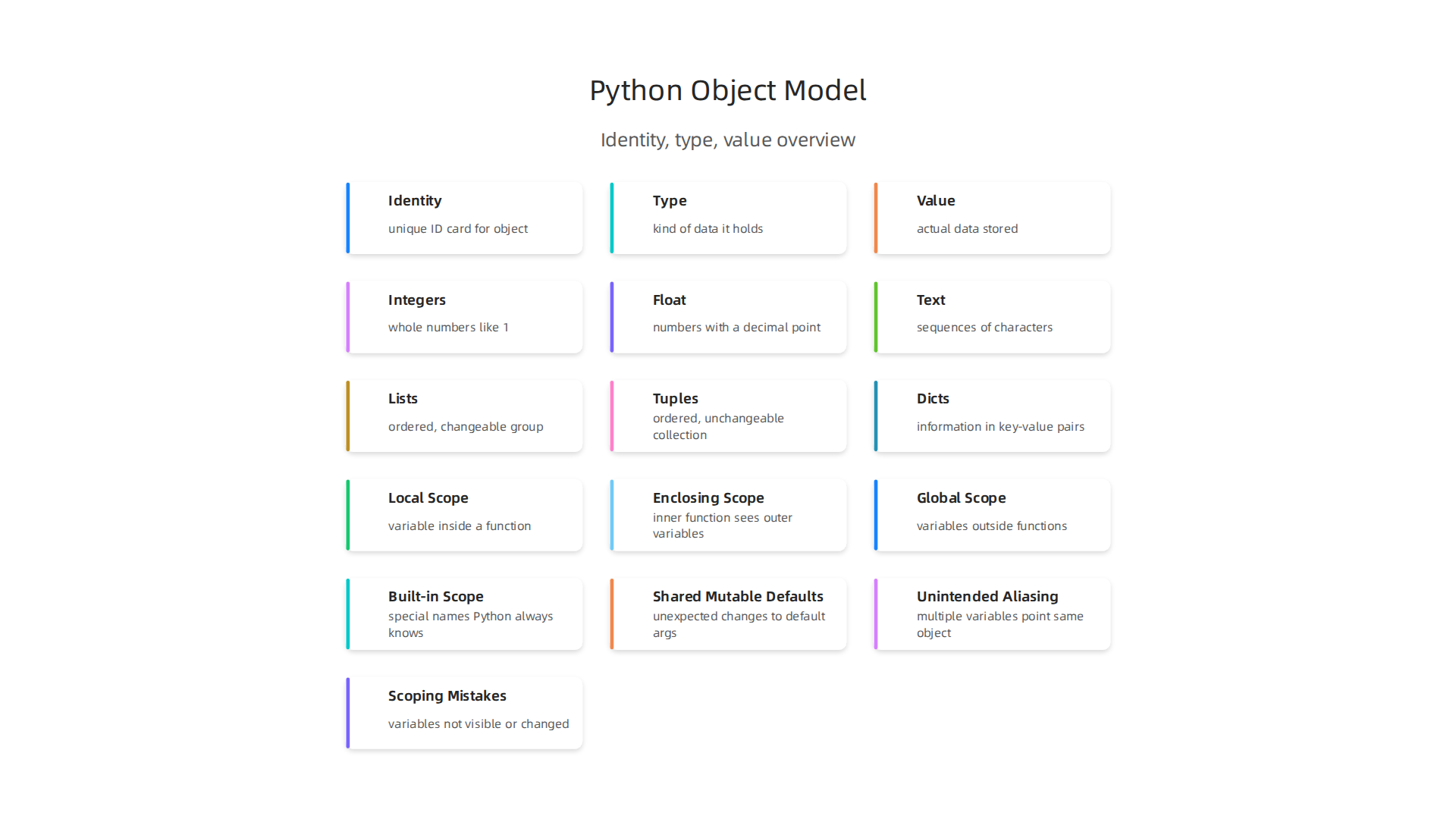
Understanding this idea that everything is an object helps you see how python variables work. A variable doesn’t store a value directly; it stores a reference or a pointer to an object in your computer’s memory [^3].
Checking Equality and Identity: is vs. ==
Since python variables are names that point to objects, we have two main ways to compare them:
-
Checking Values (
==and!=): When you use==(two equals signs), you’re asking, "Do these two variables point to objects that have the same value?" For example,5 == 5is true. If you want to check if they are not equal python, you use!=. So,5 != 10is true. This operator looks at the content of the objects [^4]. -
Checking Identity (
isandis not): When you use theiskeyword, you’re asking a deeper question: "Do these two variables point to the exact same object in the computer’s memory?" For example, ifxandyboth point to the number 5,x == ywill be true, andx is ymight also be true because Python often reuses objects for small, common values. But ifaandbare two different lists with the same items,a == bwill be true, buta is bwill be false because they are separate objects [^5].
Basic Data Types for Machine Learning
Python has many built-in data types that are very useful for machine learning tasks. Here are some common ones:
- Numbers:
- Integers (
int): Whole numbers like 1, 100, or -5. Great for counting. - Floating-point numbers (
float): Numbers with a decimal point, like 3.14 or 0.5. Used for measurements and calculations where you need more precision.
- Integers (
- Text (
str): These are sequences of characters, like "hello world" or "my_model_data." Machine learning often deals with lots of text data. - Lists (
list): An ordered group of items that can be changed. You might use a list to hold a series of numbers, names, or even other lists. Example:[1, 2, 3]. - Tuples (
tuple): Similar to lists, but once you create a tuple, you cannot change its items. They are ordered collections. Example:(10, 20, 30). - Dictionaries (
dict): These hold information in "key-value" pairs. Think of it like a real dictionary where each word (key) has a definition (value). Very handy for storing structured data, like{"name": "Alice", "age": 30}.
You can learn more about how to use a Python Dictionary for Faster Data Science and Machine Learning.
Every python global variables and local variables you create will point to an object of one of these types or another more complex type. Getting comfortable with these data types is a core part of working with Python, especially in data science and machine learning. In fact, understanding these concepts is why Python Data Types Are the Foundation of Data Science.
Staying updated on Python’s features and how they apply to AI is key in 2026. For more in-depth daily insights into AI and broader technology trends, consider checking out The AI Newsletter Worth Reading.
[^1]: Python Variables as Object References: Labels, Not Boxes
[^2]: Understand Python’s Object Model and Variable References
[^3]: Making Sense of Python’s Object Model
[^4]: Operators and Expressions in Python
[^5]: Equality versus identity in Python
The previous section explained that python variables are like labels pointing to objects in your computer’s memory. Now, let’s look at how we use these variables and objects together with special symbols called "operators" to do useful things.
Arithmetic Operators: Doing Math in Python
Just like in regular math, Python has symbols for adding, subtracting, multiplying, and dividing. These are called arithmetic operators:
- Addition (
+):5 + 3equals 8. - Subtraction (
-):10 - 4equals 6. - Multiplication (
*):2 * 6equals 12. - Division (
/):10 / 2equals 5. This always gives you a number with a decimal, even if it’s a whole number, like5.0. - Floor Division (
//): This is where you might ask, what does // do in python? It divides two numbers and gives you only the whole number part, throwing away any remainder. For example,10 // 3gives 3, not 3.333. And7 // 2gives 3. - Modulus (
%): This gives you the remainder after division. So,10 % 3gives 1 (because 3 goes into 10 three times with 1 left over). - Exponentiation (
**): This is for "to the power of."2 ** 3means 2 * 2 * 2, which equals 8.
These operators are super important for all kinds of calculations, especially when working with numbers in machine learning.
Comparison and Identity Operators
You already learned about comparing values and identities in the last section, but let’s quickly review how they fit into the bigger picture of operators.
- Comparison Operators (
==,!=,<,>,<=,>=): These operators compare values and tell you if something is True or False.==checks if two values are equal. For example,x == 5.!=checks if two values are not equal python. For example,y != 10.- There are also
<(less than),>(greater than),<=(less than or equal to), and>=(greater than or equal to).
- Identity Operators (
is,is not): These check if twopython variablespoint to the exact same object in memory. This is different from==which only checks if the values are the same. For instance,a is bchecks ifaandbare the very same object, not just if they have the same content. Understanding this difference is key to avoiding some tricky bugs, especially when you are dealing with python global variables.
Operator Precedence: The Order of Operations
Just like in math where you do multiplication before addition (remember PEMDAS/BODMAS?), Python also has rules for the order in which it performs operations. This is called operator precedence. For example, in 2 + 3 * 4, Python will do 3 * 4 first (which is 12), and then add 2, resulting in 14. If you wanted to add first, you’d use parentheses: (2 + 3) * 4 would be 5 * 4, which is 20.
Knowing operator precedence helps you write code that does what you expect. If you’re unsure, it’s always a good idea to use parentheses () to make your meaning perfectly clear. You can find a detailed list of these rules in Python’s official documentation on operator precedence. Or check out this Python Workshop – All the Operators! Precedence too.
Boolean Logic Operators
These operators let you combine True/False conditions:
and: Both sides must be True for the whole thing to be True.(5 > 3) and (10 < 20)is True.or: At least one side must be True for the whole thing to be True.(5 > 10) or (10 < 20)is True.not: This flips a True to False, or a False to True.not (5 > 3)is False.
These are vital for making decisions in your code, like "if this condition is met AND that condition is also met, then do this."
Avoiding Common Bugs in Numeric Machine Learning Code
When you’re working with numbers, lists, or other data in machine learning, how you use operators can sometimes lead to unexpected behavior. This often comes down to the difference between changing an object "in-place" versus creating a completely new object.
For example, if you have a list my_list = [1, 2, 3] and then you say another_list = my_list, both another_list and my_list point to the same object. If you then change another_list in a way that modifies the object itself (like another_list.append(4)), my_list will also change! This is because they are both just labels for the same object.
To avoid this, if you want a true copy that you can change without affecting the original, you need to create a new object. For lists, you might do another_list = my_list[:] or another_list = list(my_list).
Understanding these subtleties of how python variables reference objects and how operators interact with them is crucial for writing robust machine learning code. It helps you prevent bugs where data accidentally gets changed when you didn’t mean for it to.

Learning to optimize your machine learning workflow to cut bottlenecks and speed up model delivery often involves mastering these basic operational principles. For a deeper dive into making your Python code run faster, especially in data-heavy tasks, you can also explore how to master Python data analysis tools for machine learning in 2026.
Okay, we’ve talked about how Python uses operators to do cool stuff with values. But where these python variables live and how they can change is also super important. Let’s dig into something called "scope" and why some things can be changed and others can’t.
Scope and Mutability: Local, Global, and Changeable vs. Unchangeable
Imagine your code as a house. Each room in the house is like a special area where certain python variables can be seen and used. This idea is called "scope."
Where Do Variables Live? Understanding Scope
In Python, variables have different "homes" or scopes:
- Local Scope: This is like a tiny room inside a function. If you create a variable inside a function, it only lives there. No one outside that function can see or use it. It’s private!
- Enclosing Scope: If you have a function inside another function, the inner function can see variables from the outer function’s "room." This is called an enclosing scope.
- Global Scope: This is like the main living room of your house. Variables created outside any function are global. Any part of your code can see and use these
python global variables. This can be handy, but also tricky, as changes can affect everything. - Built-in Scope: This is like the foundation of the house. It holds special names that Python always knows, like
print()orlen(). You don’t need to create them; they are just there.
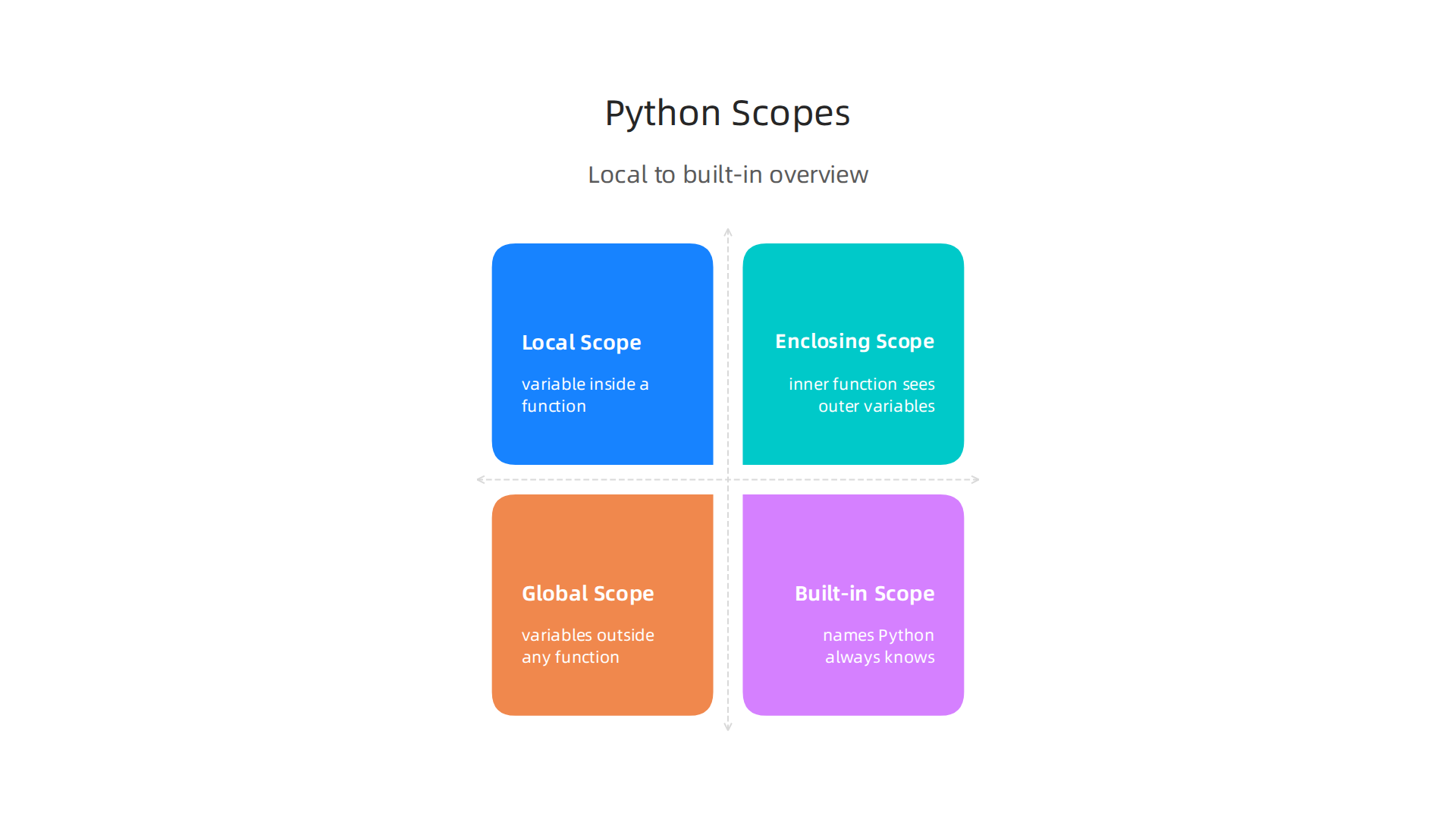
Why does this matter? Well, if you try to use a local variable outside its function, Python will get confused and tell you it doesn’t know what you’re talking about.
Sometimes, you might want to change a python global variables from inside a function. To do this, you have to tell Python explicitly using the global keyword. If you’re inside nested functions and want to change a variable from an enclosing scope (not global, but not local to the current function either), you’d use the nonlocal keyword. Using global and nonlocal should be done carefully, though. If too many parts of your code change the same global variable, it can lead to bugs that are hard to find.
Mutable vs. Immutable Objects: Can It Change?
Beyond where a variable lives, we also need to know if the object it points to can be changed after it’s made. This is the difference between mutable and immutable objects.
- Immutable Objects: These are like things carved in stone. Once you create them, you can’t change their content. If you "change" an immutable object, Python actually creates a brand new object with the new value, and your
python variablesthen points to this new object. Numbers, strings (text), and tuples (lists that can’t change) are examples of immutable types. - Mutable Objects: These are like things made of clay. You can change them after they’re created. Lists, dictionaries (collections of key-value pairs), and sets are mutable. When you change a mutable object, its content changes, but the object itself stays the same in memory.
Understanding this difference is really important for avoiding unexpected problems in your code, especially in machine learning. You can learn more about why these basic data types are so fundamental in a deeper dive into why Python data types are the foundation of data science.
Why Mutability Matters in Machine Learning Code
You might remember from the last section that if two python variables point to the same object, changing one can affect the other. This is especially true for mutable objects.
Let’s say you have a list of numbers for your machine learning model, data_a = [10, 20, 30]. If you then do data_b = data_a, both data_a and data_b point to the exact same list in your computer’s memory. If you change data_b by adding a new number, like data_b.append(40), then data_a will also show [10, 20, 30, 40]. This happens because you didn’t create a new list for data_b; you just gave the same list another label.
This can be a big problem! It can lead to what people call "side effects" or "gotchas" where your data changes when you don’t expect it to, making your machine learning models behave strangely or giving wrong results. This is a common pitfall when working with Python, as noted by many experts who highlight that mutable default arguments can cause unexpected behavior. Another common issue is how mutable objects can lead to unintended side effects.
To prevent these kinds of bugs, especially when passing mutable objects into functions or using them as default values, you often need to make a "copy" of the object. For example, to make a real copy of data_a that data_b can change without affecting data_a, you would write data_b = data_a.copy() or data_b = list(data_a). This creates a brand new list that data_b points to, leaving data_a safe and sound. Using None as a default argument for functions instead of a mutable object like a list is also a smart move to avoid mutable default argument issues.
Learning to manage mutable and immutable objects well is a key step in writing clear, bug-free Python code, especially when you are building complex data workflows. If you want to dive deeper into making your Python code run faster and more reliably, especially with lots of data, check out how to master mastering Python data workflows for peak performance.
Staying on top of these kinds of technical details is crucial in the fast-paced world of AI. For more daily updates and deeper insights into machine learning and technology, we recommend: The AI Newsletter Worth Reading.
After understanding where python variables live and how they can change, it’s also super important to talk about how we handle them in our code. Good habits here make your code easier to read, fix, and work with, especially in bigger projects like those in machine learning.

Smart Ways to Name, Type, and Start Your Variables
Think of good code like a well-organized toolbox. Everything has its place and is clearly labeled.
Give Variables Clear Names
Choosing good names for your python variables is one of the easiest ways to make your code better.
- Be Descriptive: Instead of
x, useuser_ageormodel_accuracy. This way, anyone reading your code (even you months later!) knows what each variable holds without guessing. - Follow Simple Rules: Python likes names that use lowercase letters with underscores between words, like
total_score. - Avoid Short Forms: Try not to shorten words too much.
num_studentsis better thann_std. Clear names help prevent misunderstandings, which is a key part of best practices for using Python operators in large-scale projects.
Use Type Hints
Python is a flexible language, meaning you don’t always have to say what kind of data a variable will hold. But in 2026, many people use "type hints" to make their code clearer.
- What are they? Type hints are like little notes you add to your code that tell others (and your code checker) what kind of data you expect a variable to hold. For example,
user_age: int = 30tells everyone thatuser_ageshould be a whole number. - Why use them? They help catch mistakes early. If you accidentally try to put text into a variable that should hold a number, your tools can warn you. They also make functions easier to understand, showing what kind of input they need and what kind of output they give.
Always Give Variables a Starting Value
When you create a python variables, always give it a starting value. This is called initialization.
- Why it matters: If you try to use a variable before you’ve given it a value, Python will throw an error. It’s like trying to open a box that was never filled.
- Best practice: Even if you don’t know the final value yet, set it to something like
0,""(empty text), orNone(meaning "no value yet"). This way, your program always knows the variable exists.
Variable Best Practices in Machine Learning Projects
In machine learning, where you often deal with lots of data and complex calculations, these best practices become even more important.
- Favor Immutability When Possible: Remember our talk about mutable and immutable objects? For data that shouldn’t change, like a constant setting for your model or a unique ID, use immutable types like numbers, strings, or tuples. This helps prevent accidental changes. It’s a key part of Python best practices for object mutability to avoid hard-to-find bugs.

- Be Smart with Defensive Copying: When you pass mutable objects (like lists of data) into functions or share them between different parts of your machine learning workflow, always think if you need to make a copy. Doing
new_list = old_list.copy()creates a truly separate list. This prevents one part of your code from changing data that another part relies on, leading to unexpected results. This approach helps to optimize your machine learning workflow to cut bottlenecks and speed up model delivery. - Limit Python Global Variables: While
python global variablescan be seen everywhere, they can make your code harder to understand and debug. If many parts of your code can change a global variable, it’s tough to track when and why it changed. For better performance and clearer code, it’s often better to avoid usingpython global variablestoo much and pass data into functions instead. This is one of the 10 tips to maximize your Python code performance. - Clear API Contracts: When you write functions for your machine learning models, make it super clear what kind of data they expect as input and what they will return. Type hints help a lot here. This acts like a "contract" for your functions, making it easier for other parts of your project (or other people) to use them correctly without having to guess. This is also a crucial part of building good Python for data science and machine learning in 2026 tools and workflows.
By following these simple rules, you’ll write cleaner, more reliable Python code, which is essential as you work on more complex projects in machine learning.
Even with the best practices for using python variables, sometimes things don’t go as planned. Bugs can sneak into your code, especially in bigger projects like those for machine learning.

Knowing the common mistakes and how to find them will save you a lot of time and headaches.
Common Pitfalls with Python Variables
Here are some tricky spots where python variables can cause problems:
Shared Mutable Default Arguments
This is one of Python’s most famous "gotchas." When you define a function and give a default value to an argument, like an empty list or dictionary, Python creates that default only once when the program starts.
-
The Problem: If you then change that default list or dictionary inside the function, the change sticks around for every future time you call that function without providing a new list. This leads to unexpected behavior because the default value isn’t fresh each time. Many sources highlight this issue, calling it a common pitfall in Python that can lead to unexpected changes in mutable objects across function calls Python Pitfalls – Expecting The Unexpected | Towards Data Science and a sneaky trap to avoid The Mutable Trap: Avoiding Unintended Side Effects in Python.
-
The Fix: Always use
Noneas the default argument. Then, inside your function, check if the argument isNoneand create a new mutable object if it is.def add_to_list(item, my_list=None): if my_list is None: my_list = [] my_list.append(item) return my_list print(add_to_list(1)) # Output: [1] print(add_to_list(2)) # Output: [2]
Unintended Aliasing
Aliasing happens when two or more python variables point to the exact same object in memory.
-
The Problem: If that object is mutable (like a list or dictionary), changing it through one variable will also change it for all other variables pointing to it. This can be very confusing, as modifications might appear to come from nowhere. This kind of accidental sharing can lead to hard-to-track bugs Unlocking Python’s Mutability Secrets: How Objects, Args, ….
-
The Fix: When you truly need a separate copy of a mutable object, use
copy()for lists, dictionaries, and sets. For more complex objects, you might needcopy.deepcopy().list1 = [1, 2, 3] list2 = list1 # list2 points to the same object as list1 list3 = list1.copy() # list3 is a new, separate copy list2.append(4) print(list1) # Output: [1, 2, 3, 4] (list1 changed too!) print(list3) # Output: [1, 2, 3] (list3 is safe)
Scoping Mistakes
Understanding where your python variables can be seen and changed (their "scope") is important.
- The Problem: Sometimes people create
python global variablesand change them inside functions, expecting the changes to be seen everywhere. But if you assign a new value to a variable inside a function, Python often thinks you are making a new local variable unless you specifically say it’s aglobalone. This can lead to your global variable not changing as you expect. - The Fix: Try to pass variables into functions and return new values instead of relying too much on
python global variables. If you must change a global variable, use theglobalkeyword inside the function, but be careful with this approach, as too many global variables make code messy. For more complex data management in Python, exploring concepts like Python Dictionary for Faster Data Science and Machine Learning can be helpful.
Debugging Tips for Variable-Related Bugs
When your code isn’t working right because of python variables, here’s how to investigate:
- Use Print Statements: The simplest trick! Add
print()statements before and after a variable changes to see its value. Also print itsid()(to see its memory address) to check for aliasing, and itstype()to confirm it holds the data you expect.my_var = [1, 2] print(f"Before: {my_var}, ID: {id(my_var)}, Type: {type(my_var)}") # ... some code that might change my_var ... my_var.append(3) print(f"After: {my_var}, ID: {id(my_var)}, Type: {type(my_var)}") - Check Variable Types and Values: If you expect a number but get text, your program won’t work. Use
type(my_variable)to check its type. If you’re comparing values, make sure they are indeed what you think they are. Sometimes, an unexpected difference means you need to rethink your comparison, or perhaps values arenot equal pythonas expected. - Step Through Your Code: Use a debugger. Tools like VS Code or PyCharm let you run your code line by line. You can watch how
python variableschange their values and IDs at each step. This is like slow-motion for your program and can show you exactly when things go wrong. - For ML Engineers: Watch Your Data: If your model’s performance changes in strange ways between runs, or if your training data seems to be modifying itself, variable pitfalls are often the cause. Check how your data arrays, lists, or dictionaries are being passed to functions. Look for unintended side effects from mutable objects. Unexpected behavior in your machine learning models could point to these underlying variable issues, making robust debugging practices crucial for Exploratory Data Analysis Techniques for Machine Learning in 2026.
Staying on top of the latest in AI, including how to avoid these kinds of technical pitfalls, is key for any developer. To keep informed daily, consider subscribing to The AI Newsletter Worth Reading for clear, cutting-edge updates.
Summary
This article explains why mastering Python variables is essential for machine learning engineers and walks through the core concepts you need to avoid subtle, costly bugs. It covers how assignment binds names to objects (references, not copies), Python’s object model (identity, type, value), and the practical difference between equality (==) and identity (is). You’ll learn common assignment forms, how operators like // work, and why operator precedence and boolean logic matter in ML code. The guide also clarifies scope (local, enclosing, global, built-in), the crucial distinction between mutable and immutable objects, and patterns to prevent unintended data changes. Finally, it gives naming, type-hinting, initialization best practices and debugging tips so you can write clearer, safer, and more maintainable ML pipelines.