
Exploratory Data Analysis Techniques for Machine Learning in 2026

Introduction
Data is everywhere in 2026. Companies collect more information than ever before. But here is the thing: raw data by itself is almost useless. Without the right approach to understanding it, even the smartest machine learning models can fail.
That is where exploratory data analysis (EDA) comes in. EDA is the process of examining a dataset to find patterns, spot problems, and uncover insights before you build any models. Think of it as getting to know your data the way you would get to know a new friend. You ask questions. You look for surprises. You figure out what matters and what does not.

IBM explains exploratory data analysis as a method used by data scientists to analyze and investigate data sets and summarize their main characteristics.
Here is a startling fact. Studies show that data scientists spend nearly 80% of their time on data cleaning and exploration. Poor data understanding is one of the biggest reasons AI projects fail. In fact, it contributes to up to 85% of failed AI initiatives, according to research on essential exploratory data analysis techniques from DataMites.
That is a huge number. And it makes EDA one of the most valuable skills you can have in 2026.
The challenge today is real. Data volumes keep growing. The types of data keep changing. And the pressure to deliver fast results is higher than ever. That is why knowing how to do EDA the right way matters so much.
In this guide, we will walk through a practical framework for modern EDA. You will learn techniques that work with real data. You will discover tools that save time. And you will see how to make EDA a smooth part of your machine learning pipeline.
Whether you are a data scientist, a machine learning engineer, or someone just starting to build data skills, this guide is for you. The goal is simple: help you turn messy data into real insights faster. If you are also working on your data engineer skills, many of the techniques here will help you build stronger data pipelines too.
If you want to strengthen your technical foundation, check out our guide to mastering Python data analysis tools for machine learning. It pairs perfectly with what we cover here.
And if you want daily updates on the most important AI developments, consider subscribing to The AI Newsletter Worth Reading.

It delivers clear, actionable insights straight to your inbox.
Let us start with the basics and build from there.
The Evolving Role of Exploratory Data Analysis in 2026
Here is something that might surprise you. A decade ago, EDA was mainly something you did once, right before building a model. You cleaned the data, made a few charts, checked for missing values, and moved on. But in 2026, that approach is outdated. Today, exploratory data analysis is a continuous process that runs throughout the entire machine learning lifecycle.
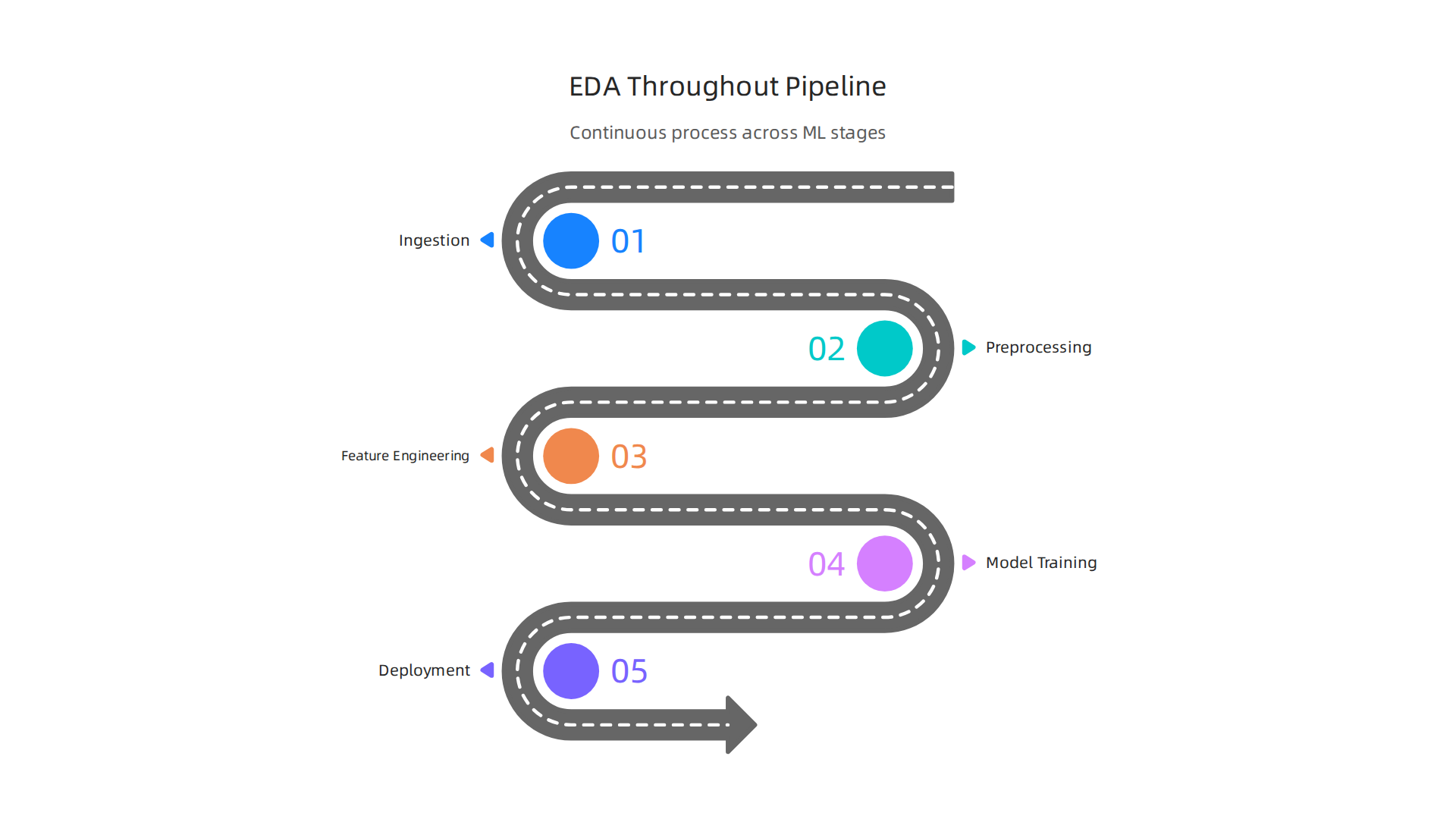
You loop back to it after every model iteration, every new data source, and every time your production metrics start to drift.
Why the shift? Because data changes fast. A dataset that looks clean on Monday can have new missing values by Friday. Feature distributions shift. New categories appear. If you only explore your data once, you miss all that. Modern teams treat EDA as an ongoing conversation with their data, not a one-time task. This is especially important for anyone building data engineer skills, because robust data pipelines need constant validation.
Automated EDA tools and AI-assisted profiling are now mainstream. You can run a single command and get summary statistics, correlation heatmaps, and even anomaly detection. Tools like these save hours of manual work. But here is the catch: human intuition still matters a lot. Machines can spot patterns, but they struggle to understand context. For example, an automated tool might flag a spike in sales as an anomaly, when really it is just a holiday season effect. That judgment call requires a human who knows the business. As one guide from the Georgia Tech OMSCS program explains, effective EDA is about discovering patterns in a way that is reproducible and grounded in reality. Automation helps, but it cannot replace your curiosity.
There is another big shift happening in 2026. Regulatory and ethical pressures are pushing teams to formalize EDA as part of responsible AI frameworks.

Governments and industry bodies now expect documentation around data quality, bias checks, and feature provenance. EDA is where you catch problems early before they become compliance headaches. This means EDA is no longer just a technical step. It is a governance step too. If you are working with sensitive data, a thorough EDA process can protect your organization from costly mistakes.
So what does this mean for you? It means you need to treat EDA as a living practice. Learn the automated tools, but also trust your own eyes. Document everything. And keep updating your skills as new techniques emerge. The field of data collection and preparation is evolving fast, and the people who stay curious will always have an edge.
If you want to stay ahead of these changes and get clear daily updates on AI and machine learning trends, consider subscribing to The AI Newsletter Worth Reading. It delivers actionable insights straight to your inbox.
Core Techniques Every ML Professional Should Master
Now that you see how EDA has become a continuous practice, let’s get practical. The core of exploratory data analysis rests on a few foundational techniques you need to know cold.
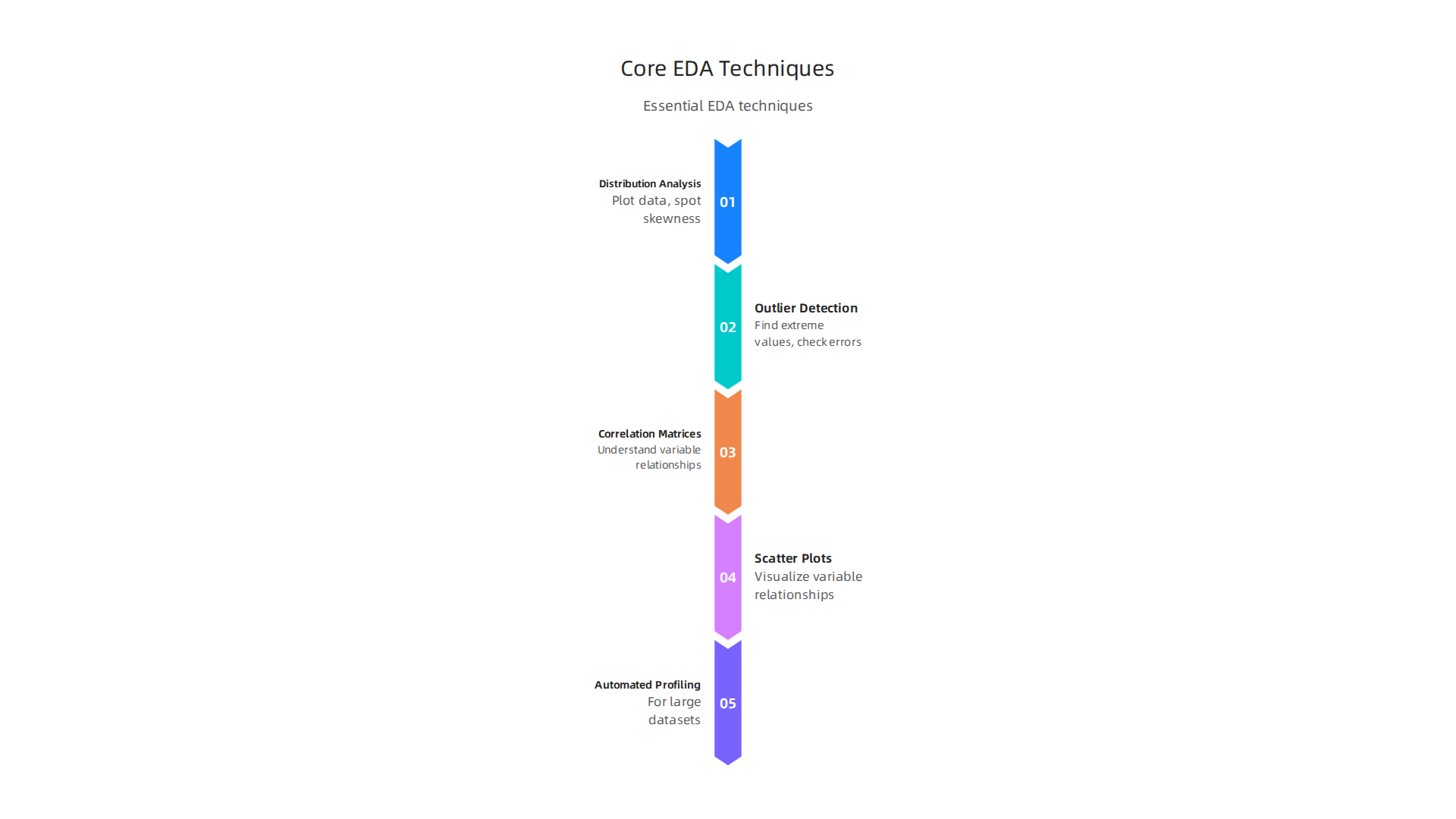
Start with distribution analysis. Before you calculate a single average, plot your data. Histograms, box plots, and density charts show you how values spread out. This helps you spot skewness and decide whether to log-transform a feature. As one detailed guide on EDA methods explains, checking distributions early prevents you from making bad assumptions about your data.
Next comes outlier detection. Use the interquartile range (IQR) or Z-scores to find extreme values. But never delete outliers automatically. Ask yourself: is this a data entry error, or a real but rare event? Domain knowledge matters here. A fraud spike might be the signal you are looking for, not noise.
Correlation matrices and scatter plots help you understand relationships between variables. Strong correlations between features can point to multicollinearity, which hurts model performance. Weak correlations might indicate that a feature adds no value.
The technique you choose depends on your data type, dataset size, and the business question you are answering. For large datasets with hundreds of columns, start with automated profiling. For small datasets, manual visualization often reveals more. And if you want to sharpen your skills, taking online data visualization courses can teach you how to pick the right chart for every situation.
To build these skills hands-on, consider mastering what is data mining really asking of your data. Mining is about extracting hidden patterns, and EDA is where those patterns first show up. Learning to interpret them is a core data engineer skill that pays off in every project.
For a deeper look at the tools that power these techniques, check out this guide on master Python data analysis tools for building efficient workflows. It covers libraries like pandas, Matplotlib, and Seaborn that make these methods fast and repeatable.
Statistical Summaries and Distribution Analysis
Before you dive into complex models, you need a quick health check on your data. That is where descriptive statistics come in. Numbers like the mean, median, standard deviation, skewness, and kurtosis give you a snapshot of what is going on. They tell you if your data is centered, how spread out it is, and whether it tilts left or right. As outlined in a practical guide on exploratory data analysis methods, checking these summary stats early helps you spot problems like skewed distributions or unexpected values.
But numbers alone can fool you. That is why you pair them with distribution plots. Histograms show you the shape of your data. A Q-Q plot compares your data to a normal distribution and reveals if you need to apply transformations like log-scaling. Modality, or how many peaks your distribution has, also jumps out visually. A bimodal distribution might mean you have two distinct groups hiding in your data.
The trick is to combine both approaches. Look at the mean and median together. If they differ a lot, your data is skewed. Check the standard deviation against your quartiles. Then plot it. This combo helps you flag data quality issues before they ruin your model. For a hands-on look at the libraries that make this fast, explore this guide on master Python data analysis tools for building efficient workflows.
Once you get comfortable reading these summaries, your exploratory data analysis will become much more powerful. And if you want to keep learning how to turn raw data into real insights, there is a resource that delivers daily AI and ML news straight to your inbox. Get clear daily AI updates from The Deep View Newsletter.
Visualization-Driven Insights
Numbers tell part of the story, but visuals tell the rest. Once you have your summary statistics in place, the next step in exploratory data analysis is to let your eyes do the work. Scatter plots, box plots, and heatmaps turn rows of numbers into patterns you can see at a glance. According to a comprehensive guide to mastering exploratory data analysis, these plots help you identify anomalies, uncover uneven distributions, and recognize patterns that are not obvious from summaries alone.
Take scatter plots for example. They show you how two variables move together. Do sales go up when ad spend goes up? A scatter plot answers that faster than any table can. Box plots are great for spotting outliers across categories. And heatmaps let you see correlation across many variables in one colorful grid. Stakeholders love these because they do not need to read code to understand what is happening.
But here is a trap. When you have too many data points, scatter plots turn into a blob. That is overplotting. You fix it by making points transparent, using sampling, or switching to a hexbin plot. Another trap is misleading scales. If you start your y-axis at 100 instead of 0, small differences look huge. Always check your axis limits.
Interactive dashboards take things further. Tools that let stakeholders filter, zoom, and drill down make your EDA findings even more useful. A dynamic chart can show a marketing team their Q3 campaign data by region without you rebuilding the plot each time. If you are looking for the right platforms for this, check out the best data analysis tools for ML teams in 2026.
The big lesson is simple. Plot first, ask questions later. Visualization is not just for the final presentation. Use it early to find the patterns that guide everything else. When you master this, your exploratory data analysis becomes faster and more convincing to everyone involved.
Correlation and Multivariate Analysis
Visuals give you a feel for your data, but they do not always tell you how variables relate to each other. That is where correlation matrices and pair plots step in. A correlation matrix shows the strength of the relationship between every pair of variables in your dataset. When two variables have a correlation close to 1 or -1, you might have multicollinearity on your hands. That is a problem for many machine learning models because it becomes hard to tell which variable is actually driving the prediction.
Pair plots take this further. They scatter every variable against every other variable in a grid of small charts. You can spot nonlinear patterns and clusters at a glance. According to a roundup of exploratory data analysis tools for 2026, tools like Python and R make generating these plots simple with just a few lines of code.
But what happens when your dataset has dozens or hundreds of variables? A giant grid of tiny plots stops being useful. That is when you reach for dimensionality reduction techniques like PCA, t-SNE, or UMAP. These methods shrink your high-dimensional data down to two or three dimensions while keeping the important structure intact. You can then plot the reduced data and see groupings that were invisible before.
You also need to watch for outliers that only show up when you look at multiple variables at once. A single variable might look normal, but combining it with others reveals something unusual. That is where Mahalanobis distance comes in. It measures how far a point is from the center of a distribution while accounting for relationships between all variables. This kind of multivariate outlier detection is essential if you want your final model to be robust.
If you want to build these skills further, check out this guide on master Python data analysis tools. It walks through practical techniques for working with real datasets.
And if you want to stay on top of the latest trends in data analysis and machine learning, The AI Newsletter Worth Reading delivers clear daily updates straight to your inbox.
Tools and Environments for Modern EDA
So you have a good handle on spotting correlations and outliers. But the real question is: what should you actually use to run your exploratory data analysis? The tool ecosystem in 2026 has grown way beyond just Python and Jupyter notebooks. Now you have options for every skill level and every type of data.
If you are comfortable writing code, Python with Pandas, Seaborn, and Plotly still gives you the most control. R with ggplot2 is another solid choice. But for many people, especially those starting out, the idea of writing code feels like a barrier. That is where low-code and no-code tools come in.
A great overview of the current landscape covers four main paths. You can stick with programming libraries, use automated EDA tools, try no-code AI platforms, or lean on BI tools. Each path serves a different need. According to a detailed comparison of exploratory data analysis tools for all skill levels, automated libraries like ydata-profiling (formerly Pandas Profiling), Sweetviz, and D-Tale let you generate a full report with one line of code. That is huge for speed. You get histograms, correlation matrices, missing value counts, and more without writing a single loop.
But speed is not everything. You also need to think about scale and teamwork. Many teams now use integrated ML platforms that combine data exploration, model training, and deployment in one place. Tools like Databricks and Snowflake have built-in AI agents that answer natural language questions and run code for you. That means even non-technical team members can explore data without asking a data engineer for help.
No-code platforms like Rows, Polymer, and Julius AI let you upload a spreadsheet and get instant visualizations. They are perfect for quick checks before you dive into deeper analysis. And for enterprise reporting, Tableau and Power BI still dominate. They give you drag-and-drop dashboards that update live.
So how do you choose? It depends on your team’s skills, the size of your data, and where you work. If you are a solo analyst running quick checks on a small dataset, automated EDA libraries are your best bet. If you are part of a large team dealing with terabytes of data, you probably need an enterprise platform. And if you want to build your skills step by step, start with a no-code tool and gradually move to Python.
For a deeper look at how these tools compare in real ML projects, check out this guide on choosing the right data analysis platform for ML teams. It breaks down when to use each option based on concrete examples.
The tools are out there. The trick is matching them to what you actually need.
Integrating EDA into the ML Pipeline
Here is something many people miss. They treat exploratory data analysis like a one-time check at the start of a project. You look at the data, find a few patterns, and move on. But that approach does not work well in real machine learning workflows.
The truth is, EDA should be part of every stage of the ML pipeline.
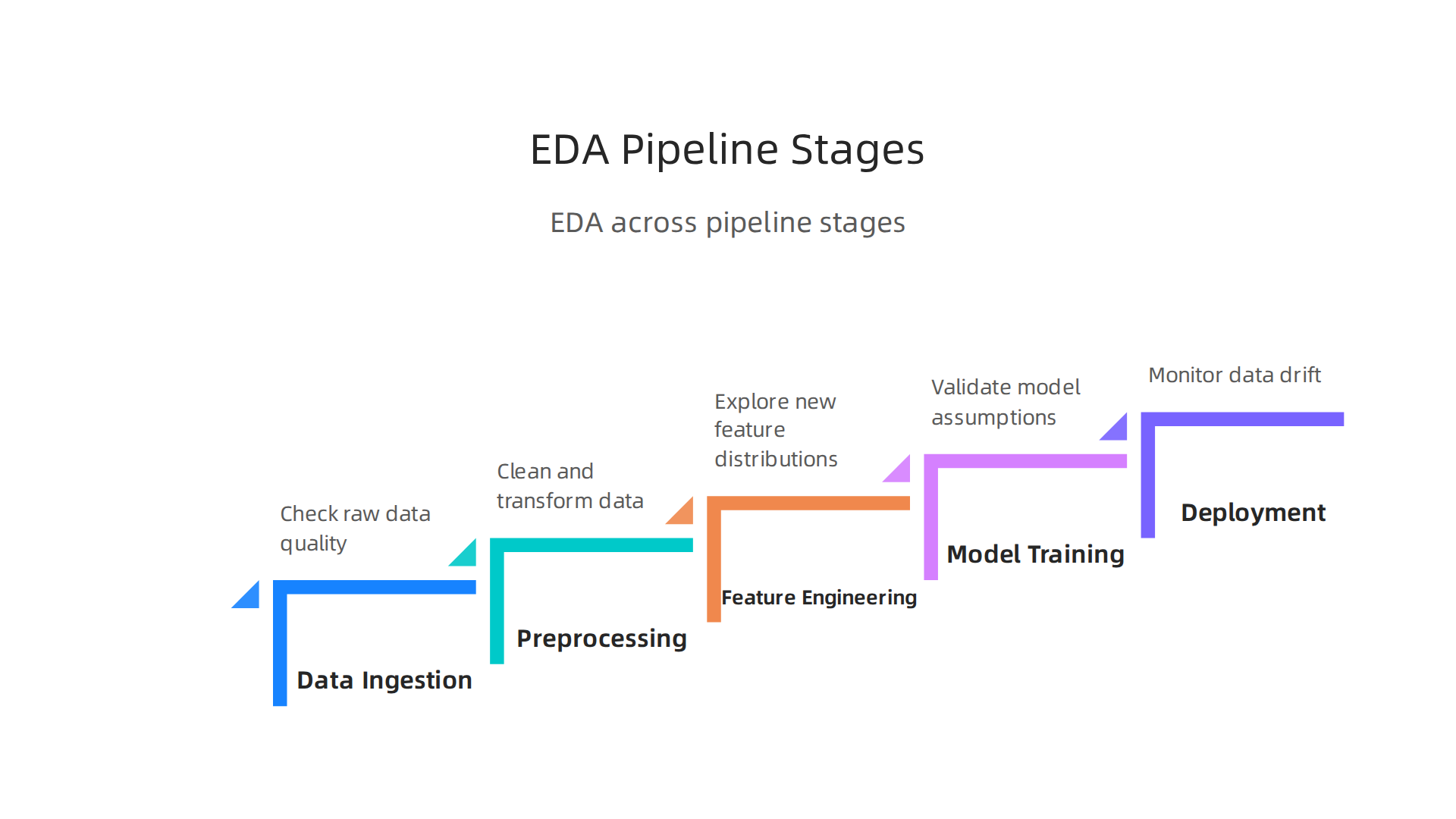
It starts during data ingestion, when you first pull raw data into your system. You need to check if the data looks right before you spend time cleaning it. Then it continues through preprocessing and feature engineering. Every time you create a new feature, you should explore its distribution and relationship to the target.
When you are ready to train a model, EDA helps you validate your assumptions. You can spot data leakage or unexpected patterns that might trick your model. And after deployment, EDA still matters. Data drift and new data arrivals can change everything.
This is where MLOps comes in. Modern teams build "continuous EDA" into their workflows. Instead of doing EDA once, they set up automated checks that run every time new data arrives or a model needs retraining. According to the MLOps guide on exploratory data analysis with AI insights, MLOps frameworks suggest automating EDA reports using AI powered summaries and version controlling datasets.
You can also turn your EDA logic into data quality tests that run in your CI/CD pipeline. For example, you might write a test that checks if a column’s missing value rate exceeds 10%. If it does, the pipeline stops and alerts your team before bad data reaches the model.
A good way to start is to save your EDA scripts as reusable functions. Then connect them to your pipeline triggers. Every time data changes, the EDA runs again automatically. This saves time and catches problems early.
To learn more about keeping your data clean throughout the pipeline, check out this guide on automating data validation with Python dataclasses. It shows how to build validation checks that fit right into your workflow.
And if you want to stay on top of the latest best practices in MLOps and data science, consider subscribing to The AI Newsletter Worth Reading. It delivers daily updates on the tools and techniques that actually matter.
Best Practices for Handling Data Quality and Bias
Here is where exploratory data analysis really earns its keep. Before you ever train a model, EDA acts as your first line of defense against messy data. And messy data can completely ruin your results.

Think about the problems that sneak into real world datasets. Missing values appear in random columns. Duplicate rows slip in during data collection. Inconsistent formats make it hard to compare records. A solid EDA process catches all of these early.
The InfluxData guide on best practices for MLOps explains how EDA helps you understand the nature of your data by identifying anomalies and patterns. This is exactly where you spot the trouble before it reaches your model.
But data quality is only half the story. The harder problem is bias.
Bias hides in plain sight. It shows up when certain groups are underrepresented in your dataset. Or when historical patterns in the data reflect unfair decisions from the past. During EDA, you need to look at distributions across sensitive attributes like age, gender, race, and location.
Here is what that looks like in practice. You create a histogram of your target variable grouped by a sensitive attribute. If the distributions look very different, that is a red flag. You might find that your data overrepresents one demographic while barely including another. That imbalance will trick your model into favoring the majority group.
The good news is that organizations now have tools to help. Fairness toolkits like AIF360 and Fairlearn are designed to work right alongside your EDA workflow. They help you measure bias, visualize disparities, and decide whether you need to rebalance your data.
This kind of bias detection does not have to be slow. Modern teams build automated fairness checks into their EDA scripts. Every time you run an analysis, the script checks distributions across sensitive attributes and flags any that look suspicious.
If you want a deeper look at how bias can damage your models and what to do about it, check out this article on the dangers of AI bias in 2026. It covers specific examples and practical steps for keeping your models fair.
Measuring the Impact of EDA on Model Performance
So how do you know if your exploratory data analysis is actually paying off? The answer is simpler than you might think. You measure what happens before EDA and compare it to what happens after.
This is the pre/post comparison approach. You run your model training pipeline without a thorough EDA pass. Record your metrics. Then you run the same pipeline with a proper EDA cycle. Compare the two. The difference is the ROI of your EDA work.
A study using exploratory data analysis to analyze financial data found that after thorough EDA, decision tree models achieved an R² value of 0.97, while models without similar data understanding performed much worse. That is the kind of impact you can expect when you invest time upfront.
Key indicators to watch
- Training time. When your data is clean and well-understood, your model converges faster. You waste fewer cycles on bad features or skewed distributions.
- Accuracy and precision. Models trained on data that has been properly explored consistently outperform those trained on raw, unexamined data. The difference is often dramatic.
- Retraining cycles. Teams that skip EDA end up retraining models over and over as they discover hidden issues. Thorough EDA cuts that number significantly.
- Production incidents. Models that fail in production almost always trace back to something missed during data exploration. Fewer incidents means higher trust from stakeholders.
Organizations that invest in serious EDA report something else too: confidence. When you know your data inside and out, you deploy models with fewer surprises. Your team sleeps better at night.

The trick is to build measurement into your workflow. Track your model metrics before and after EDA improvements. Document the changes. Over time, you build a strong case for why EDA deserves more time and budget.
If you want to speed up your entire ML pipeline and reduce bottlenecks, take a look at this guide on optimizing your machine learning workflow. It covers practical ways to integrate EDA deeper into your process.
And if you want to stay on top of the latest techniques for measuring and improving model performance, get clear daily AI updates from The AI Newsletter Worth Reading. It helps you spot trends before they become standard practice.
Summary
This guide explains modern exploratory data analysis (EDA) and why it is essential for reliable machine learning in 2026. It shows how EDA has shifted from a one‑time task to a continuous practice across ingestion, feature engineering, training, and production monitoring, and it highlights the balance between automated profiling and human judgment. You’ll learn core techniques—distribution checks, visualizations, correlation and multivariate analysis, outlier detection—and how to choose tools from code libraries to no‑code platforms. The article also covers integrating EDA into MLOps, automating data quality and fairness tests, and methods for measuring EDA’s ROI on model metrics. After reading, you’ll know what checks to run, which tools fit your team, and how to make EDA a repeatable, governance‑ready part of your ML workflow.