
Python Dictionary for Faster Data Science and Machine Learning

If you have ever tried to store data in Python and found yourself juggling messy lists or confusing indexes, you are not alone.

Many beginners start with lists but quickly realize they need a better system. That is where the dictionary python structure comes in. A dictionary stores data as key-value pairs, much like a real dictionary where you look up a word (the key) and get its definition (the value). This makes your code cleaner and your data much easier to manage.
Dictionaries are especially important in machine learning. When you work with large datasets, you often need to store features, labels, or model parameters in a way that is fast to access. A Python dictionary guide explains that dictionaries use a hash table under the hood.
This means looking up a value by its key takes roughly the same time whether you have 10 items or 10 million. That speed is a big reason they are everywhere in python data analysis.
Understanding how dictionaries work internally can help you avoid common performance mistakes. For example, knowing how hash collisions work or when to use a dictionary instead of a list can make your code run faster and be easier to read. Once you get comfortable with dictionaries, you can explore related tools like python enumerate for looping, or even test your skills in a python playground.
In this guide, we will cover everything from the basics of hash tables to real-world ML use cases. If you want to stay on top of the latest AI and machine learning developments, consider subscribing to The AI Newsletter Worth Reading.

For more hands-on practice, check out our master Python data analysis tools for machine learning guide.
Why Python Dictionaries Matter for Data Science and Machine Learning
You might wonder why the dictionary python structure gets so much attention in data science and machine learning. The answer comes down to speed and organization. When you build a model, you often need to map features like "age" or "income" to their numerical values.

A dictionary lets you do that in constant time. No matter if you have 10 features or 10,000, looking up a key takes the same tiny amount of time. That O(1) performance makes dictionaries perfect for feature maps, hyperparameter tuning, and storing model configurations.
Think about how you set up a machine learning experiment. You usually have a config dict that holds learning rates, batch sizes, and other settings. Instead of hunting through a messy list, you just call config["learning_rate"] and you are done. This is why understanding python data analysis workflows starts with mastering dictionaries.
But dictionaries do not just sit alone. They power the tools you use every day. The Pandas DataFrame, for example, is built on top of dictionary-like structures under the hood. NumPy arrays often rely on dicts for indexing and metadata. Even Scikit-learn uses dictionaries to store model parameters and results. When you call model.get_params(), you get back a dictionary. So every time you train a model or analyze data, you are leaning on the same core idea.
For real-time AI applications, dictionaries shine even brighter. An AI system might need to cache previous predictions or store user session data. A dictionary gives you that quick lookup without slowing down the response. Many production systems use dictionary-based caches and configuration stores to keep things running smoothly.
If you are just getting started, a great way to practice is to build a small ML project using only dictionaries. Map feature names to values, store your model weights in a dict, and track experiment results. You will see how clean and fast your code becomes. For a step-by-step plan on breaking into data science roles, check out our guide on how to land entry level data science jobs in 2026.
Dictionaries are not just a Python feature. They are the backbone of modern data science and machine learning. Once you see how they fit into the bigger picture, you will wonder how you ever managed without them.
Dictionary Internals: Hashing, Collisions, and Performance
You now know dictionaries are fast, but how do they actually work under the hood? The secret is a data structure called a hash table. When you insert a key into a dictionary python, Python runs that key through a hash function.
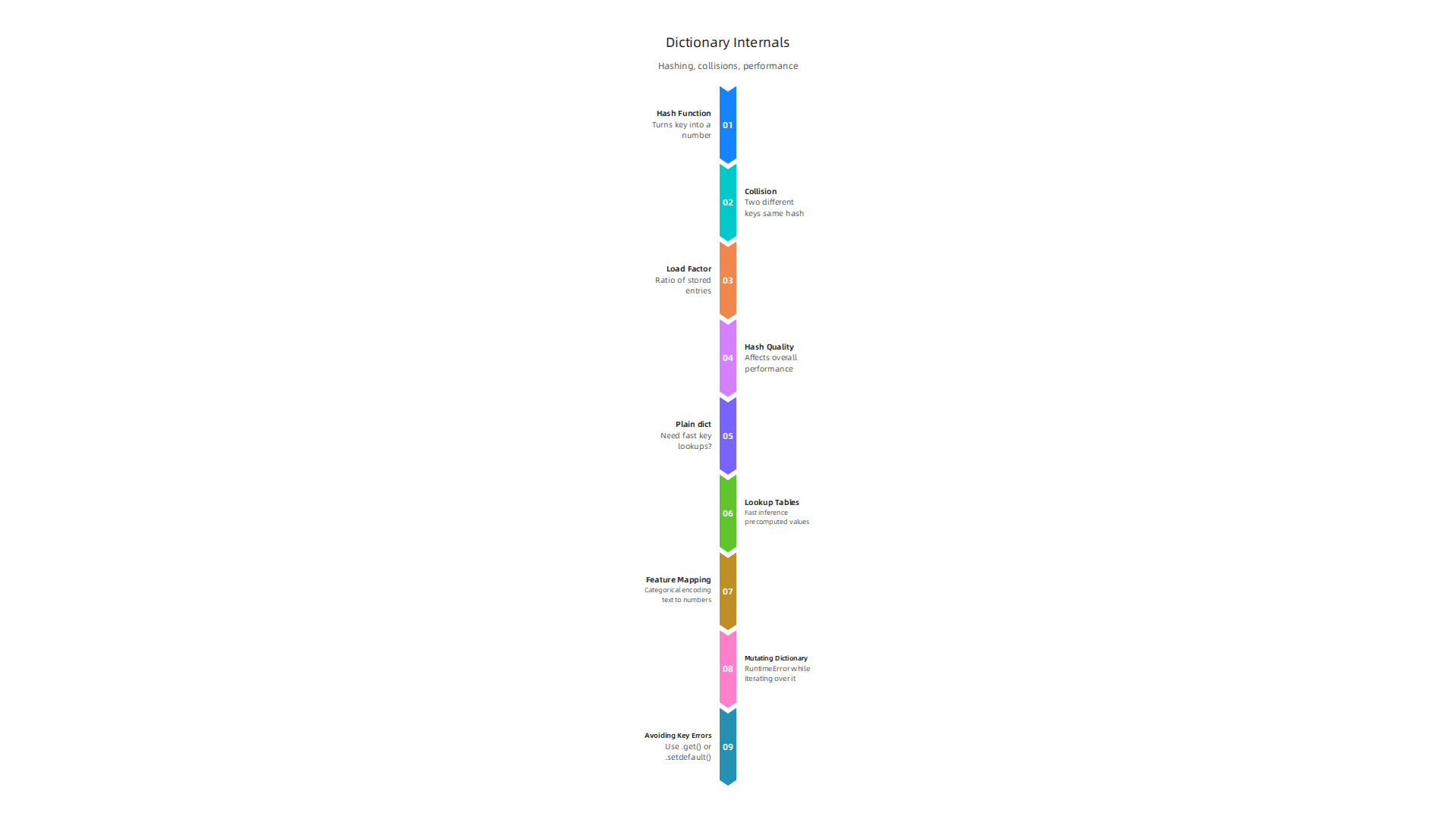
The hash function turns the key into a number. Python then uses that number to decide where to store the value in memory. This is why lookups are so quick. You do not need to scan every item. You just compute the hash and jump straight to the right spot.
But the real world is messy. Sometimes two different keys produce the same hash. That is called a collision. Python handles collisions using a method called open addressing with probe sequences. When a collision happens, Python does not put the new key in a list. Instead it looks for the next available empty slot. It follows a predictable pattern, or probe sequence, until it finds an open spot. This approach keeps memory compact and lookups fast in most cases.
Load factor matters a lot here. Load factor is the ratio of stored entries to total available slots. Python keeps the load factor around two-thirds. When the dictionary gets too full, Python resizes it. It allocates a bigger table and rehashes all the keys. This resize operation takes time, but it happens rarely. The trade-off is worth it. A low load factor means fewer collisions and faster lookups. But it also means more wasted memory. Python balances these two needs well.
The quality of the hash function also affects performance. Python uses a randomized hash seed per interpreter session to protect against denial-of-service attacks. Bad hash quality can cause many collisions. In the worst case, a dictionary can slow down to O(n) performance, the same as a list. That is rare in normal use, but it can happen if you use custom objects with poorly written __hash__ methods.
Over the years, CPython has made big improvements to dict internals. Python 3.6 introduced a compact representation that uses 20% to 25% less memory than the old design, as documented in the Python 3.6 release notes.
This change also made dictionaries preserve insertion order, which became a guaranteed feature in Python 3.7. More recent versions have continued to tweak the implementation for speed and memory efficiency.
Understanding these internals helps you write better code. If you are building a large-scale data pipeline, being aware of collisions and load factors can prevent performance surprises. To learn more about optimizing your Python code for data work, check out our guide on mastering Python data workflows for peak performance.
Dictionary internals are not just academic. They directly affect how your machine learning models run and how your data pipelines scale. The more you understand them, the fewer bottlenecks you will hit.
If you want to stay ahead of these updates and get clear daily AI updates, consider subscribing to The AI Newsletter Worth Reading.
Advanced Dictionary Methods and Patterns
Standard Python dictionaries are powerful, but the collections module gives you even better tools for common tasks.

If you find yourself writing a lot of checks like if key in my_dict, you can probably use a better pattern.
defaultdict is a subclass of dict that handles missing keys automatically. You give it a default factory function. When you access a key that does not exist, defaultdict calls that function and sets the key to the returned value. This saves you from writing if key not in my_dict: my_dict[key] = [] over and over. For example, defaultdict(int) is perfect for counting items. defaultdict(list) makes grouping data easy. The official Python documentation covers the full details in the collections — Container datatypes page.
Counter is another subclass of dict built specifically for counting hashable objects. It gives you handy methods like most_common() to get the top N items. You can also add or subtract counters, which is great for comparing frequency data. A common question is when to use defaultdict(int) versus Counter. The short answer is: use Counter when you only need to count and want the extra methods. Use defaultdict(int) when you are also doing other things with the values, like summing more than just counts. A detailed discussion on this trade-off is available on the Python: Collections.Counter vs defaultdict(int) Stack Overflow page.
OrderedDict remembers the order you inserted keys. Since Python 3.7, regular dictionaries also preserve insertion order, but OrderedDict still offers extra features. You can use move_to_end() to reorder items, and popitem(last=True) to remove items from either end. This makes OrderedDict useful for implementing an LRU (Least Recently Used) cache or any order-sensitive data structure.
ChainMap is less well known but very useful. It groups multiple dictionaries into a single view. When you look up a key, ChainMap searches through each dictionary in order. This is great for working with layered configurations, like combining default settings with user overrides without copying data.
Dictionary comprehensions let you build dictionaries in a single, readable line. The pattern is {key_expr: value_expr for item in iterable if condition}. This is ideal for transforming data, like converting a list of tuples into a dict or applying a mapping function to all values. For machine learning workflows, dictionary comprehensions are a clean way to build feature dictionaries or normalize data.
Mastering these patterns will make your code shorter, faster, and easier to read. And when you are ready to apply these skills to real-world data projects, you can explore our guide on how to master Python data analysis tools for machine learning.
Dictionaries in Data Manipulation: Pandas, NumPy, and More
Dictionaries are the secret backbone of data analysis in Python.

They act as a natural bridge between your raw data and the powerful tools you use to analyze it. Whether you are working with Pandas or NumPy, understanding how dictionaries connect to these libraries will save you time and make your code cleaner.
When you get data from a CSV file or an API, it often comes as a list of dictionaries. Pandas makes it easy to turn that into a DataFrame. You can pass a dictionary to pd.DataFrame() and the keys become column names. For more control, the official documentation explains how to use the pandas.DataFrame.from_dict method to specify orientation and data types.
That is a one-line transformation from messy data to a clean table.
But there are trade-offs. Using a dictionary as a data store can be very fast for certain tasks. A benchmark on Stack Overflow shows that accessing a single element by key from a dictionary is over 100 times faster than using DataFrame.loc. That is covered in the Pandas DataFrame performance discussion. So if you only need to look up values quickly, a dictionary might be enough. For heavy number crunching or complex analysis, a DataFrame adds features that make your life easier.
NumPy also uses dictionary-like thinking. A structured array lets you name fields, similar to dictionary keys. You can access a column by name using arr['field']. This makes code more readable and helps you keep data organized, especially when preparing features for machine learning models.
Dictionaries truly serve as a natural bridge between raw data and analytical structures. They are easy to build, inspect, and share. And once you have mastered this connection, you can move on to building real projects. If you want to keep learning about the latest tools and best practices in data analysis, consider subscribing to a resource that delivers fresh insights straight to your inbox. You can get clear daily AI updates from The Deep View Newsletter to stay ahead in 2026.
Performance Optimization: When to Use Dictionaries vs. Other Structures
Choosing the right data structure can make your code run faster and use less memory. Dictionaries are fantastic for key-value lookups, but they are not always the best choice. Let’s break down when to reach for a dictionary and when another structure works better.
Dictionaries vs. Lists for Lookups and Sequential Access
If you need to find a value by a unique identifier, a dictionary is your friend. Looking up a key is extremely fast because Python uses a hash table. But if you need to go through items in order one by one, a list is faster. Iterating over a list is quicker than iterating over a dictionary because lists store data in a simple contiguous block. So for sequential access, stick with a list.
Sets for Membership Tests
Do you only need to check if something exists? Do not store keys with values. Use a set. Sets work like dictionaries but without storing values. They take less memory and perform membership tests just as fast. For example, checking if a number is in a large collection is more efficient with a set than with a dictionary that maps keys to None.
Which Dictionary Variant Should You Use?
Python’s built-in dict has improved a lot. Since version 3.6, CPython uses a compact representation that saves 20% to 25% memory compared to Python 3.5. This is described in the What’s New in Python 3.6 documentation. The new dict also preserves insertion order starting in Python 3.6, and this became a guaranteed language feature in Python 3.7. So for most cases, a plain dict is all you need.
But sometimes you need special behavior. Use collections.defaultdict when you want to automatically set a default value for missing keys. It saves you from writing extra checks. Use collections.OrderedDict when you need to rely on order in older Python versions (pre-3.6) or when you need methods like move_to_end(). The built-in dict now supports reversal and ordering, so the differences are shrinking.
Making the Right Choice in Your Dictionary Python Code
Here is a quick guide to help you decide:
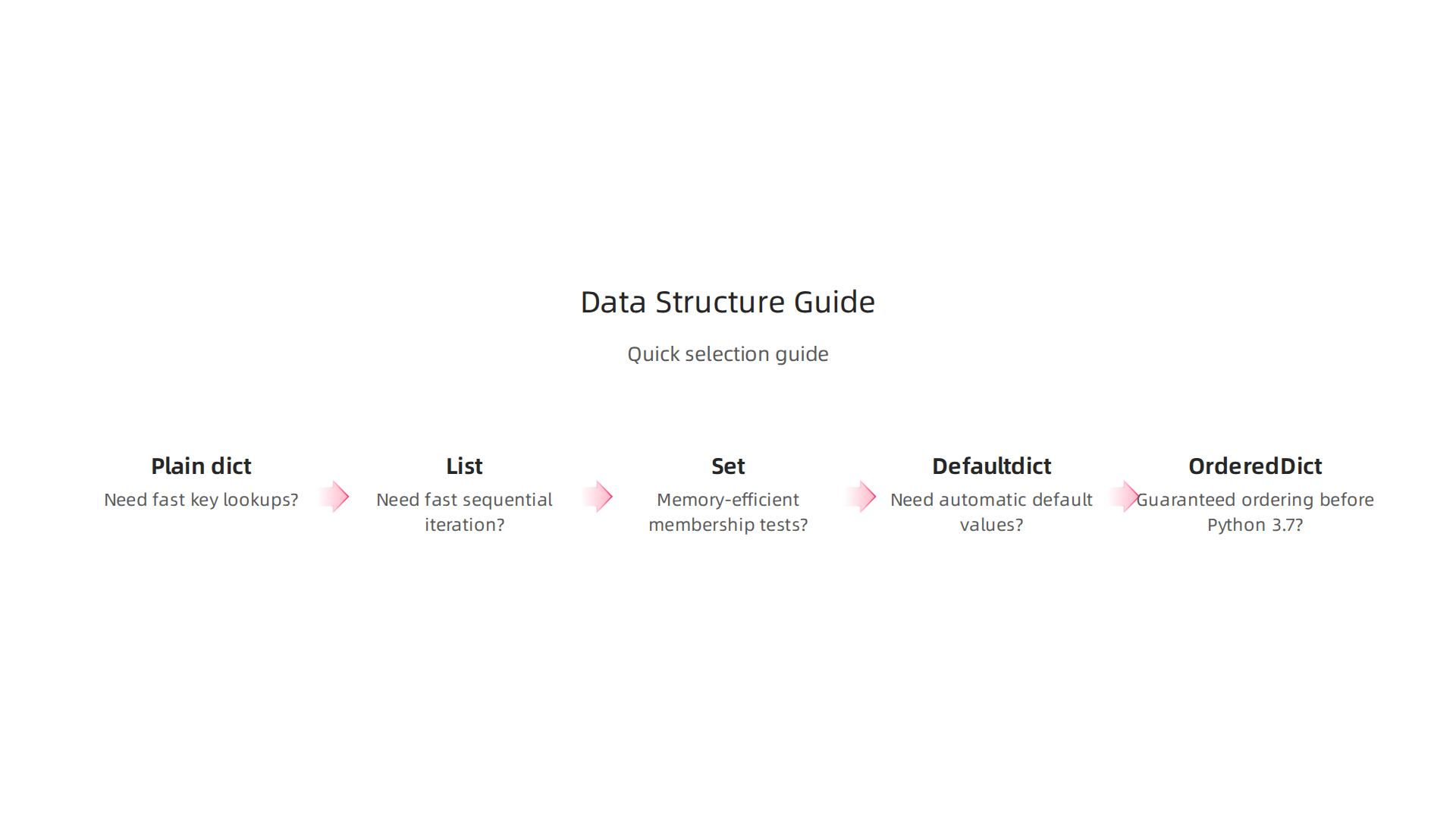
- Need fast key lookups? Use a plain
dict. - Need fast sequential iteration? Use a
list. - Need memory-efficient membership tests? Use a
set. - Need automatic default values? Use
defaultdict. - Need guaranteed ordering before Python 3.7? Use
OrderedDict.
Getting these choices right will speed up your dictionary python code and keep your data analysis running smoothly. If you want to dive deeper into building efficient data pipelines, check out this guide on mastering Python data workflows for peak performance. It covers more ways to optimize your code for real-world projects.
Real‑World Use Cases: Feature Engineering, Hyperparameter Tuning, Lookup Tables
Now let’s look at how dictionaries shine in actual data science and machine learning projects.
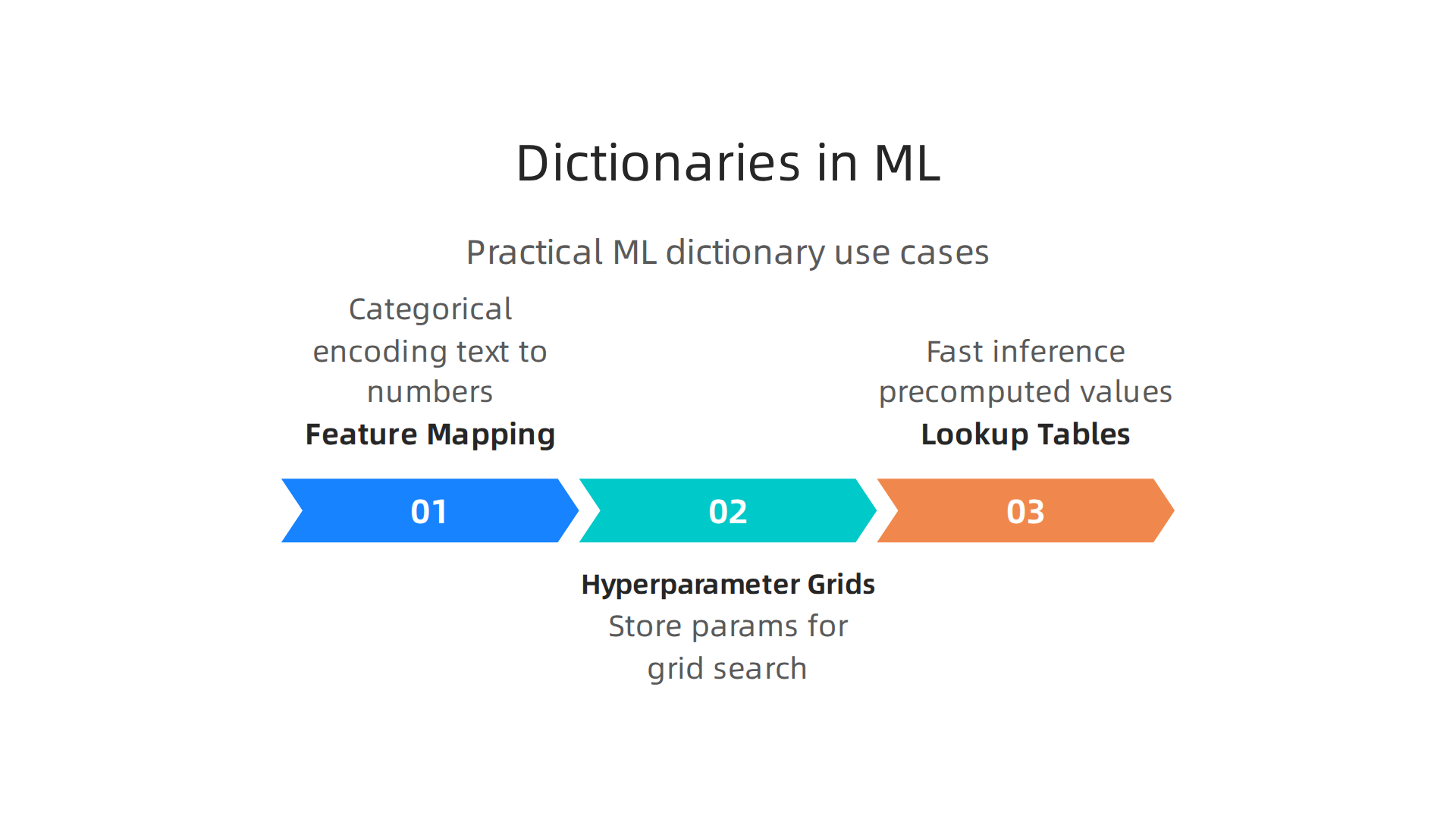
These three common tasks are where a well‑placed dict can save you time and reduce errors.
Feature Mapping Dictionaries for Categorical Encoding
When you work with categorical data, you often need to turn text labels into numbers before feeding them into a model. A dictionary is the perfect tool for this. You create a mapping like {'red': 0, 'blue': 1, 'green': 2} and then use Python’s .map() method to transform your column in one line. This is cleaner than writing long if‑elif chains. After mapping, you can easily convert the result into a pandas DataFrame. The official pandas DataFrame from_dict documentation shows how to build a DataFrame directly from a dictionary, which is a common step after feature encoding.
Hyperparameter Grids as Dictionaries for Grid Search
When tuning a machine learning model, you define a set of hyperparameters to test. The most natural way to store these is a dictionary. For example:
param_grid = {
    'n_estimators': [50, 100, 200],
    'max_depth': [3, 5, None],
    'learning_rate': [0.01, 0.1, 0.2]
}
Grid search libraries like scikit‑learn expect this exact format. Using a dictionary keeps your code readable and easy to expand. You can also use for loops with dict.items() to iterate over parameter names and values. And if you need to number the iterations, the enumerate function works great with that loop, giving you both the index and the parameter combination.
Lookup Tables for Fast Inference in Production
Once a model is deployed, you often need to map inputs to precomputed values without recalculating. A lookup table stored as a dictionary is the fastest way to do this. For instance, you might map a product ID to its discount rate or a ZIP code to a regional tax factor. Because dictionary lookups are O(1), your inference code stays snappy even with millions of entries. This is a classic example of choosing the right structure for python data analysis workflows.
Putting It All Together
In your daily work, you will constantly reach for dictionaries to encode categories, organize model experiments, and accelerate production code. These patterns are so common that mastering them will make you a more efficient data practitioner. To keep sharpening these skills, explore the complete guide to master Python data analysis tools for machine learning in 2026. And if you want to stay current with the latest trends and techniques in AI and machine learning, check out The Deep View Newsletter for daily updates delivered straight to your inbox.
Common Pitfalls and Best Practices
Even experienced Python developers trip up with dictionaries from time to time. Knowing these common mistakes and how to fix them will save you hours of debugging.
Mutating a Dictionary While Iterating Over It
Here is one of the sneakiest bugs in Python. If you try to add or remove keys from a dictionary while you are looping through it, Python will raise a RuntimeError. The dictionary changes size during the loop, and the interpreter cannot keep up.
The fix: Always iterate over a copy of the dictionary. Use list(my_dict.items()) or my_dict.copy() to create a snapshot. Then you can safely modify the original. A cleaner option is to build a new dictionary using a comprehension or a for loop that only includes the keys you want to keep.
Over‑relying on Dictionary Comprehensions Hurts Readability
Dictionary comprehensions are great for simple transformations like {k: v*2 for k, v in data.items()}. But when the logic gets complex, a comprehension becomes a wall of text that is hard to read and even harder to debug.
The fix: If your comprehension requires more than one conditional or a nested loop, switch to a regular for loop. Your future self and your teammates will thank you. Readable code is always better than clever code.
Avoiding Key Errors with .get() and .setdefault()
One of the most common frustrations is a KeyError when you try to access a key that does not exist. The brute‑force solution is to wrap every access in an if key in dict: block. That works, but it adds clutter.
The fix: Use the built‑in .get() method to return a default value if a key is missing. For example, value = my_dict.get('missing', 0). If you also want to set that default value when the key is absent, use .setdefault(). It assigns the default and returns it in one step. For more advanced cases, the defaultdict from the collections module can handle this automatically. You can learn more from a mastering defaultdict comprehensive guide that shows real‑world examples.
Adopting these best practices will make your code safer and easier to maintain. If you want to sharpen your Python data skills further, check out this guide on mastering Python data workflows for peak performance. And to stay ahead of the latest trends in AI and machine learning, get clear daily updates from The AI Newsletter Worth Reading.
Summary
This article explains why Python dictionaries are essential for data science and machine learning, showing how they store data as fast key‑value maps and where they fit into real ML workflows. It covers dictionary internals—hash tables, collisions, load factor and resizing—so you understand performance implications and can avoid slowdowns. The guide also surveys advanced tools from the collections module (defaultdict, Counter, OrderedDict, ChainMap), practical integrations with Pandas and NumPy, and clear rules for when to use dicts versus lists or sets. You’ll find concrete examples like feature mapping, hyperparameter grids, and lookup tables for production inference, plus best practices to prevent common bugs such as mutating while iterating. After reading, you’ll be able to pick the right structure, apply dictionary patterns effectively in your projects, and optimize performance-sensitive code.