
Achieve Reproducible Machine Learning with venv Python
Why virtual environments matter for ML teams
Machine learning (ML) teams often work on many different projects at the same time. Think of it like cooking several meals in one kitchen. Each meal needs its own ingredients and tools. If you mix everything up, it becomes very hard to cook any one meal correctly. The same thing happens with computer code.
For example, imagine one ML project needs an older version of a specific python module to run correctly. Another project, maybe a newer python ai model, needs a brand-new version of the exact same module.
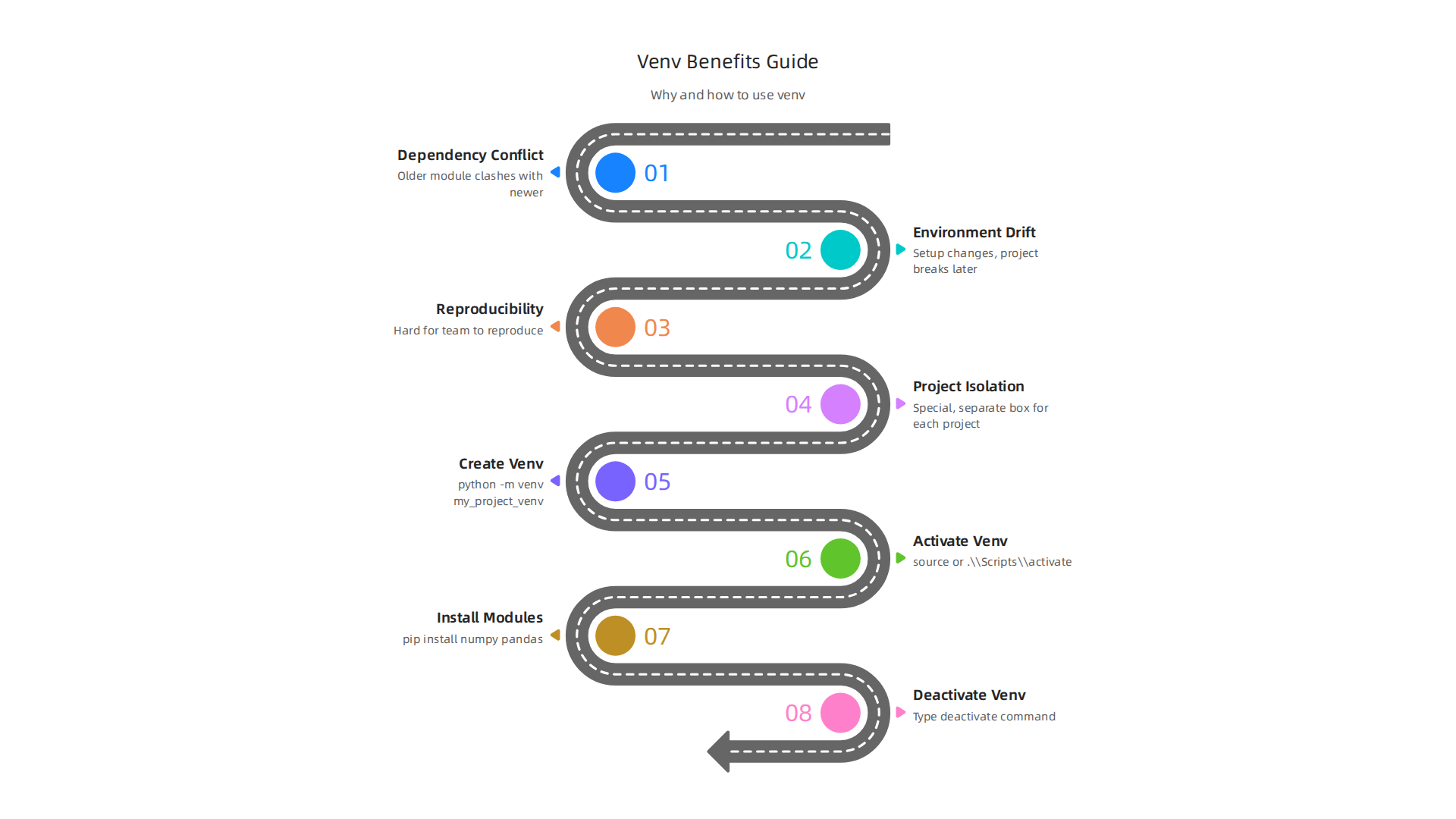
If you install both on your main computer, they can clash. This is called a "dependency conflict." When this happens, one project might suddenly stop working, or it might work differently than you expect. This makes it really hard for your team to get the same results every time, which is known as "reproducibility."

Another common problem is "environment drift." Over time, you might add new python modules or update some that are already there. This changes your computer’s Python setup. A project that worked perfectly last month might break today because something in your main setup changed. This can be a big headache for ML teams, especially when you need to share code or make sure your models work reliably.
This is where virtual environments, often called venv python, become super important. A venv python environment is like a special, separate box for each of your projects. Inside this box, you get its own Python and its own set of python modules. This way, Project A’s older module won’t cause problems for Project B’s newer module because they are kept completely separate. Python 3.3 and all newer versions even have the venv module built right in, making it easy to create these isolated spaces.
In this guide, we will walk you through how to use venv python effectively. We’ll show you how to set up these isolated boxes, avoid common mistakes, and make your machine learning work much smoother. You’ll learn how to manage important tools like python json libraries within these safe, clean spaces. This will help your ML teams ensure their code works exactly as planned, every single time. For more ways to make your Python projects stronger, explore our guide to Python machine learning libraries for 2026 success.
Want to stay informed about the latest AI updates?
The AI Newsletter Worth Reading
Understanding venv: how it works and when to use it
To really get how venv python helps, let’s look closer at what it does. When you create a venv for your project, Python makes a special folder. You can name this folder anything, but often people call it venv or env. Inside this folder, Python puts its own copy of the Python program. It also makes a place for all the specific python modules your project will need. It’s like giving your project its very own Python brain and a private library shelf for its tools.
This setup works because when you "activate" your venv, your computer’s PATH changes. The PATH is like a list of directions your computer follows to find programs. When the venv is active, your computer knows to look first in your project’s special folder for Python and its python modules. This means that any python ai tools or python json libraries you install go only into that project’s folder and don’t affect other projects on your computer. When you are done working on that project, you "deactivate" the venv, and your computer goes back to using its regular Python setup. This clever trick ensures your projects stay clean and separated. Python 3.3 and newer versions have the venv module built right in, making this process simple to start. You often create one using a command like python -m venv my_project_name. For best practices on setting up and maintaining these environments, consider looking at a Python venv complete virtual environment guide (2026).
How venv is different from other tools
While venv python is great for many tasks, it’s helpful to know about other tools that also manage Python environments.
-
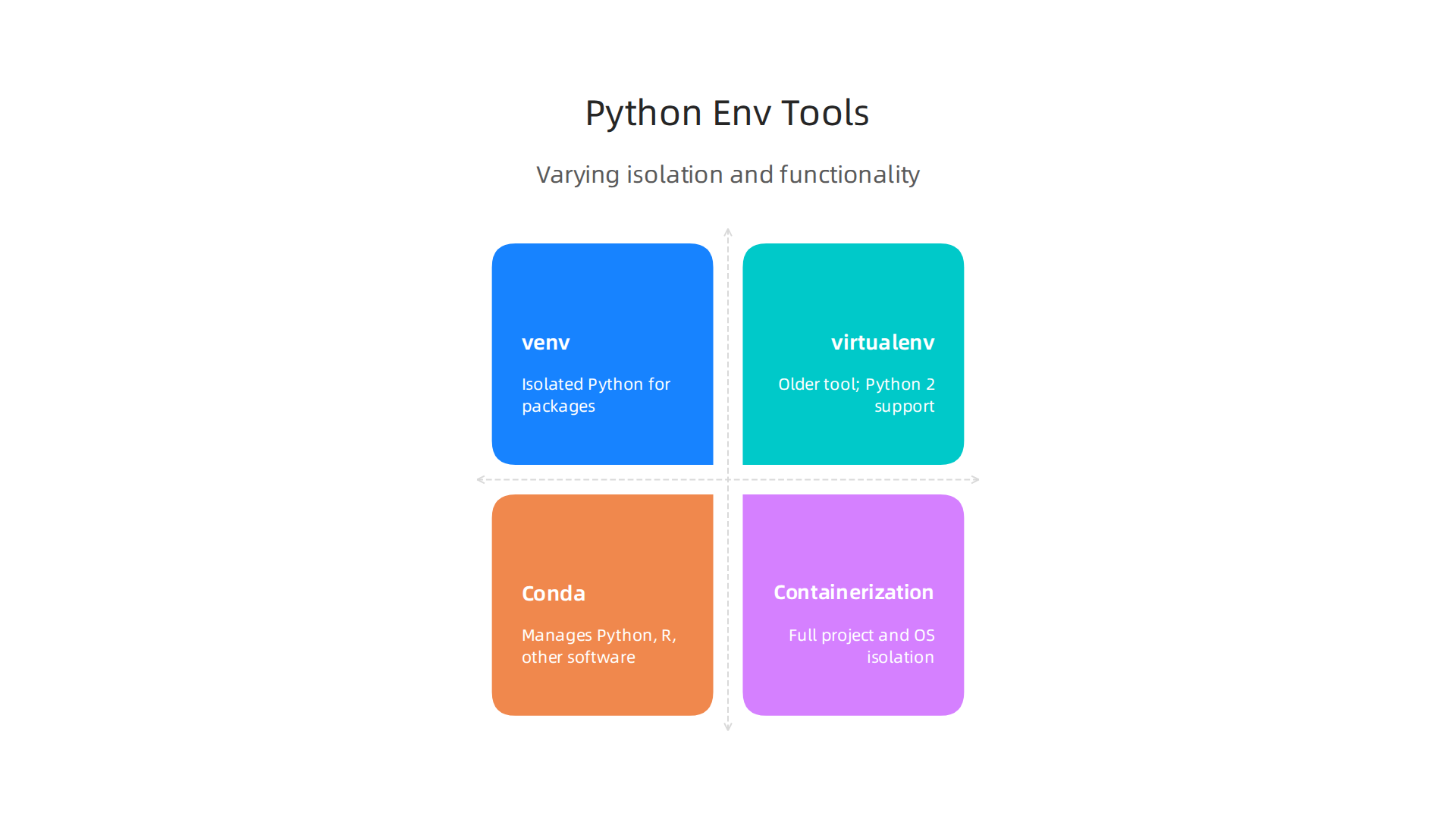
virtualenv: Think of
virtualenvasvenv‘s older sibling. Before Python 3.3,virtualenvwas the main way to create isolated Python environments.venvis actually built from a simpler version ofvirtualenvand is now part of Python itself. If you’re using modern Python (3.3 or newer),venvis usually all you need.virtualenvis still useful if you need to work with older Python 2 projects, whichvenvdoes not support. -
Conda:
Condais a much bigger tool. It does more than just manage Python.Condacan handle Python versions, other programming languages like R, and even non-Python software that your projects might need. For example, if yourpython aiproject requires a specific version of a non-Python library,Condacan manage that for you. This makes it very powerful for data science teams that work with a wide range of tools.venvis focused only on Python packages, whileCondais for more complex setups that cross different software types, as noted in resources comparing Virtualenv vs Conda. -
Containerization (like Docker): This takes isolation to the next level. Tools like Docker create a "container" which is like a small, self-contained computer. Inside this container, you put your entire project, including the operating system, Python, and all its
python modules. This means your project will run exactly the same way, no matter where it is. Containerization is often used for deployingpython aimodels to servers or sharing very complex setups, ensuring everything works perfectly every time.venvis more for local development work, while containers are for ensuring consistent deployment.
When to choose venv
Given these options, when should you use venv python?
It’s your best choice for most Python projects where you only need to manage Python code and its python modules.
- Simple Python projects: If your project is mainly Python and doesn’t need to link up with lots of other non-Python programs,
venvis perfect. - Preventing module clashes: It excels at keeping different project dependencies separate, like making sure Project A’s
python jsonlibrary version doesn’t break Project B. - Lightweight and easy: It’s built into Python 3.3+, which makes it simple to use without installing extra tools.
- Team compatibility: When your team works on a shared project, everyone can set up the same
venvto ensure their code runs in the same environment, boosting reproducibility.
For a deeper dive into organizing your Python development, learn to master your Python stack for data science in 2026.
Now that you understand what venv python is and why it’s useful for keeping your projects tidy, especially for python ai and python json tasks, let’s go over how to actually use it.
It’s a simple process that makes a big difference.
Create, activate, and manage a venv: step-by-step for ML projects
Creating a venv is the first step. You usually want to make this special folder right inside your project’s main folder.
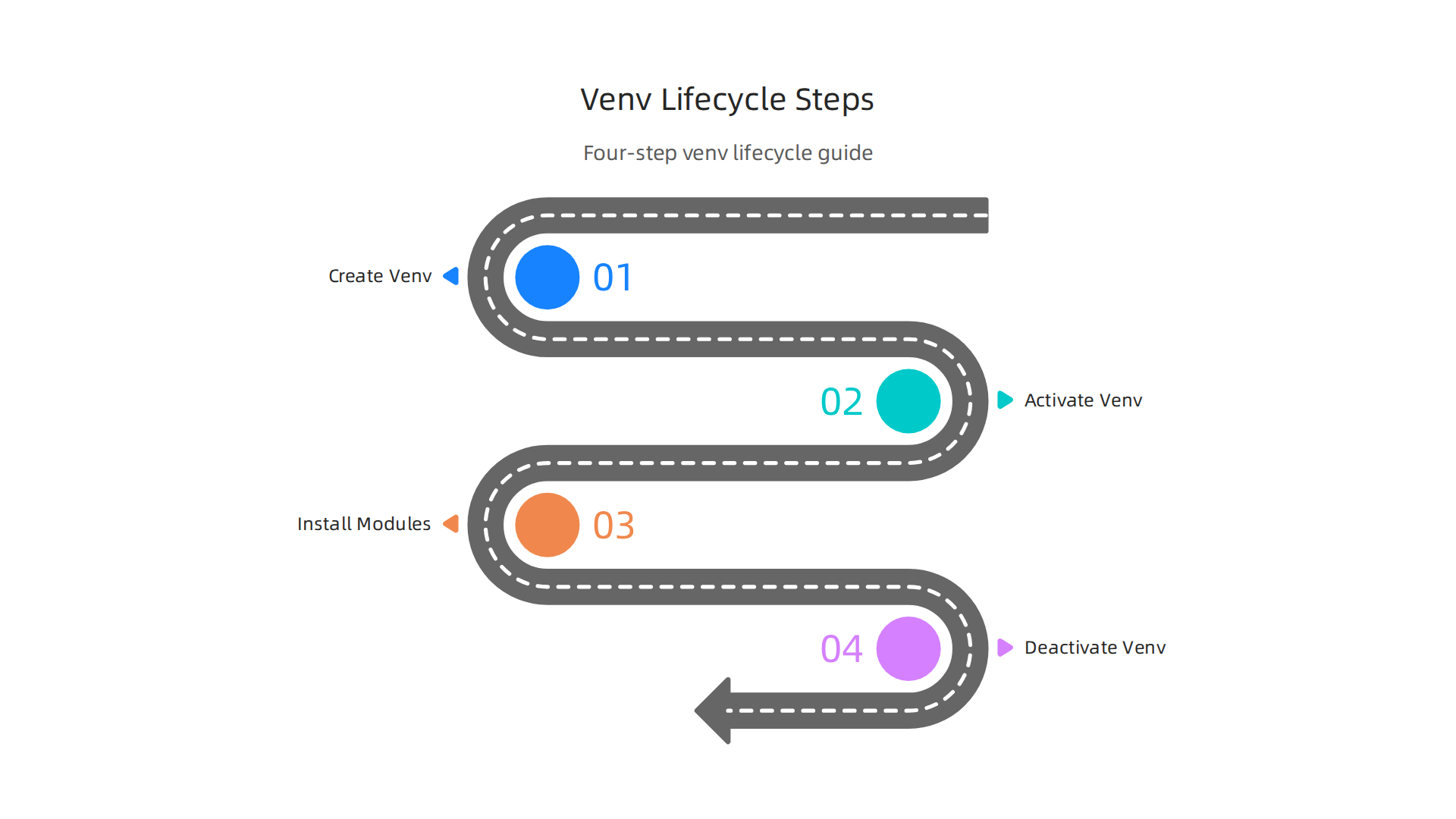
Many people name this folder venv or .venv so it’s easy to spot and often hidden by default.
To create one, open your computer’s command line (like Command Prompt on Windows or Terminal on macOS/Linux) and go to your project folder. Then, type this command:
python -m venv my_project_venv
Here, my_project_venv is the name of your virtual environment. You can use any name you like, but keeping it simple like venv or env is common practice. This command tells Python to make a new, isolated environment in that folder, ready for your specific python modules 2026 projects will need 12. Virtual Environments and Packages.
Once your venv is made, you need to "activate" it. This step tells your computer to use the Python and its installed tools from your venv folder, not your computer’s main Python. How you activate it depends on your operating system:
-
On macOS and Linux (Bash or Zsh):
source my_project_venv/bin/activate -
On Windows (Command Prompt):
my_project_venv\Scripts\activate.bat -
On Windows (PowerShell):
.\my_project_venv\Scripts\Activate.ps1
You can learn more about these platform-specific commands for activating environments from resources like Creation of virtual environments.
After activation, you’ll usually see the name of your venv (like (my_project_venv)) at the start of your command line. This is a helpful sign that you’re working inside your isolated environment. Now you can install any python modules your python ai or python json project needs, and they’ll only go into this venv. For example:
pip install numpy pandas scikit-learn
When you’re finished working on your project, you can "deactivate" the venv. This puts your computer’s command line back to using its regular Python setup. Just type:
deactivate
The (my_project_venv) name will disappear from your command line, showing you’re back to your global Python.
Organizing your project with a venv
For machine learning projects, a good setup makes things much smoother, especially when working with others.
- Place your
venvwisely: Keep yourvenvfolder (like.venv) in the main folder of your project. This keeps everything together. - Use
requirements.txt: This file lists all thepython modulesyour project needs. It’s super important for sharing your project.- To create it after you’ve installed all your modules in your active
venv:pip freeze > requirements.txt - To install all required
python modulesinto a newvenvfor yourself or a teammate:pip install -r requirements.txt
- To create it after you’ve installed all your modules in your active
This file acts like a recipe, telling others exactly what ingredients (modules) they need. Tools like pip-tools can help create very precise requirements.txt files, often called lock files, which list the exact version of every single module, ensuring your project runs the same way everywhere pip-tools: Python Dependency Pinning Tools. This is crucial for project reproducibility.
Understanding how to set up your project structure, including where to place your venv and manage your requirements.txt file, helps a lot with complex machine learning work. For more insights into setting up structured and repeatable projects, explore guides on a Cookiecutter data science project structure for reproducible ML.
To stay on top of the latest advancements in AI and machine learning that impact these best practices, consider signing up for
The AI Newsletter Worth Reading.
After you get your venv python environment set up, the next big step is making sure all your python modules are managed well. This is super important, especially for python ai and python json projects where specific versions of tools can make a big difference.
Managing dependencies for reproducible ML: pip, constraints, and lockfiles
pip is Python’s main tool for installing packages. When you activate your venv, any pip install commands only put packages into that special environment. But simply listing packages in a requirements.txt file (like we saw before with pip freeze > requirements.txt) might not always be enough for truly exact setups. Sometimes, the versions of packages can change, or a package you need might secretly depend on another package that also changes. This can lead to your project working fine on your computer but breaking on someone else’s. This is where lockfiles come in.
A lockfile is like a very detailed recipe. It writes down the exact version of every single python module your project uses, even the ones that your main packages depend on. This makes sure that anyone trying to run your project, whether it’s you next year or a teammate across the globe, gets the exact same setup. This is called "reproducibility" in machine learning, and it’s super important for making sure your results are reliable Reproducibility in Machine Learning.
How tools like pip-tools help
While pip freeze > requirements.txt gives you a list of installed packages, tools like pip-tools take it a step further. pip-tools actually uses two main files:
requirements.in: This is where you list only the mainpython modulesyour project directly needs, often with some flexibility in their versions (e.g.,numpy>=1.20).requirements.txt(the lockfile): You then use a command frompip-toolscalledpip-compileto read yourrequirements.infile. It then figures out all the exact versions of all the packages (your main ones and all the ones they depend on) and writes them into arequirements.txtfile. This generatedrequirements.txtbecomes your lockfile Python Dependency Pinning Tools.
Once you have this detailed requirements.txt lockfile, you can use pip-sync (another pip-tools command) to make sure your venv matches it exactly. This means it will install, update, or remove packages to make your environment identical to what’s in the lockfile. This is much more precise than just pip install -r requirements.txt, which might still fetch slightly different versions if the specified versions are not strictly pinned. Python is even moving towards a standard lockfile format to make this easier in the future Python Adopts Standard Lock File Format for Reproducible Installs.
Lockfiles in ML research vs. production
The way you use lockfiles can depend on what you’re doing:
- For Production Machine Learning Projects: Here, strict lockfiles are a must. When you deploy a
python aimodel, you want to be absolutely sure that the code runs the same way every time, no surprises. A lockfile guarantees this by pinning every single package version Python Dependency Pinning. This helps you build production ML systems that are reliable. - For ML Research and Experiments: You might want a little more flexibility. Sometimes, you want to try the very latest versions of
python modulesto see if they offer new features or speed improvements. In this case, you might keeprequirements.inwith broader version ranges. However, even in research, when you find results you want to keep, it’s wise to create a lockfile for that specific experiment so you can always go back to it.
Another important thing for python ai projects, especially those using GPUs, is managing special packages like CUDA toolkits. TensorFlow and PyTorch often need specific versions of CUDA to work right, and these versions can depend on your GPU drivers Tensorflow. For example, installing TensorFlow might need a specific CUDA Toolkit version, like CUDA 11.1 Installing TensorFlow 2.9.3 using pip and venv. Your lockfile helps make sure these complex dependencies are all handled correctly. Getting your python stack for data science perfectly aligned is a big part of successful machine learning.
While venv python environments are excellent for keeping your python modules tidy and separate from other projects, they don’t isolate everything. Think of a venv like a special box just for your Python code and its direct add-ons. It ensures that the specific versions of python modules you use for one project don’t clash with another. This is super helpful for python ai projects, as different models might need different versions of libraries like TensorFlow or PyTorch.
However, a venv doesn’t control the deeper parts of your computer’s setup. This includes things like:
- System Libraries: These are basic building blocks that your operating system and some applications need.
- CUDA Toolkits: For
python aiprojects that use your computer’s graphics card (GPU) to do heavy calculations, you need NVIDIA’s CUDA Toolkit. This is a special software layer that allows Python to talk to the GPU. - GPU Drivers: These are the essential programs that let your computer’s operating system communicate with your graphics card itself.
The challenge is that python ai libraries often need very specific versions of CUDA and GPU drivers to work right. For example, a certain version of TensorFlow might only work with CUDA 11.1, which in turn needs a specific range of GPU drivers Installing TensorFlow 2.9.3 using pip and venv. If these don’t match up, your python ai model simply won’t run on the GPU, even if your venv is perfectly set up. Rutgers CS Technical Services also notes the importance of aligning CUDA versions with AI tools and Python versions for optimal performance Cuda and AI / Learning tools. It’s like having the right tools in your toolbox (your venv) but the wrong workbench (your system’s CUDA and drivers).
Combining venv with System Setup for GPU Projects
To solve this, especially for GPU-based training and inference, you often need to go beyond just venv python. Here are a couple of popular ways to handle this in 2026:
- Containerization (like Docker or Apptainer): This is like putting your entire project, including your
venv, system libraries, CUDA, and even a specific operating system, into one neat package. A container ensures that yourpython aiproject will run the same way everywhere, no matter what host system it’s on, as long as the host has compatible GPU drivers. Tools like Apptainer, for example, are used for running GPU machine learning tasks in isolated environments Apptainer Containers. You can even install missingpython modulesdirectly into a container environment GPU Machine Learning. - Careful Host Driver Management: If you don’t use containers, you need to be very careful with the CUDA Toolkit and GPU drivers installed directly on your computer. NVIDIA drivers are usually backward-compatible, meaning a newer driver can often work with older CUDA versions Working Environment – GAIVI’s Documentation!. However, matching your specific
python ailibrary’s CUDA requirement to the CUDA Toolkit on your system is key. Many machine learning platforms, like the University of Florida’s research computing, guide users to install a CUDA toolkit package to ensure compatibility with NVIDIA drivers for packages like PyTorch or TensorFlow GPU Use – UFIT-RC Documentation.
By understanding what your venv python isolates and what it doesn’t, you can better prepare your environment for complex python ai and machine learning tasks, making sure your GPU-powered projects run smoothly.
Want to stay on top of all the latest advancements in AI and machine learning?
The AI Newsletter Worth Reading
Get clear daily AI updates from The Deep View Newsletter.
Now that we’ve talked about how venv python environments fit into your system, especially for GPU work, let’s look at how to take your python ai projects from development to a working setup that others can use. This means packaging your models and making sure they run the same way every time, no matter where they are. This is called reproducible runtime images.
Packaging Your Machine Learning Models
When you’re ready to share or deploy your python ai model, you need to package it nicely. This involves more than just zipping up your code.
-
Wheels for Python Modules: A "wheel" is a special kind of package for
python modules. It’s like a pre-built ready-to-install version of your project and its dependencies. This makes installing your project much faster and more reliable, especially if it has parts that need to be built from source code. When you runpip install your_project.whl, it puts everything in place quickly. This is often done after you’ve developed your code within avenv pythonenvironment. -
Requirements Files (Lock Files): After setting up your
venv pythonand installing all yourpython modules, you need to record exactly which versions you used. This is super important for reproducibility. Arequirements.txtfile is a simple list of packages and their versions (e.g.,tensorflow==2.15.0). Tools likepip-toolscan create "lock files" that list all dependencies, even those your main packages rely on. This is called "dependency pinning" and helps make sure your project works consistently across different setups Python Dependency Pinning: requirements.txt vs Poetry. In 2026, many teams use tools like Poetry, Pipenv, oruvto manage these locked dependencies, as they ensure every package is set to an exact version uv vs Poetry vs pip-tools for reproducible dependency installs. There’s even a new standard lock file format, PEP 751, being adopted to make this easier Python Adopts Standard Lock File Format for Reproducible Installs.
Docker Images for Full Reproducibility
For serious python ai deployment, especially for model serving, you’ll often use Docker.

Docker is a containerization tool that lets you package your application and all its parts into a single unit. Think of it as a super-powered venv.
- Building from venv-managed environments: You can start with your
venv pythonsetup, create yourrequirements.txt(or lock file), and then use that to build a Docker image. The Docker image will contain:- A specific operating system (like Ubuntu).
- A specific Python version.
- Your
venv‘spython modulesinstalled. - Your
python aicode and trained models. - Any system libraries, like the CUDA Toolkit if you’re using GPUs.
This creates a complete "runtime image" that can run anywhere Docker is installed, ensuring your model works the same way every time. Using Docker helps with "versioning everything," which is key for reproducible machine learning operations in 2026 MLOps Pipeline Automation Best Practices in 2026.
Lightweight venv vs. Full Container Images: Trade-offs
Here’s a look at when to use which:
| Feature | Lightweight venv-based Deployment | Full Container Images (e.g., Docker) |
|---|---|---|
| Isolation | Isolates Python packages. Relies on host system for other software. | Isolates everything: OS, Python, packages, system libraries. |
| Reproducibility | Good for Python packages with lock files. Host system setup can vary. | Excellent for full reproducibility. "Works on my machine" means "works everywhere." |
| Size | Small, only contains Python packages. | Larger, includes a full (though minimal) operating system. |
| Setup Time | Faster to set up on a machine with correct system tools already. | Can take longer to build initially, but deployment is faster and more reliable. |
| Use Case | Local development, testing, lighter scripts, simpler python ai tasks. |
Production deployment, complex python ai models, microservices, cloud. |
| GPU Considerations | Requires careful host CUDA/driver management. | Can bundle specific CUDA versions directly, if drivers are compatible on host. |
For many python ai tasks that need to run consistently in different places or in production, containers offer the best path to full reproducibility. They are a core part of building reliable machine learning systems. If you’re looking to enhance your understanding of how to manage your Python environments effectively for these complex tasks, exploring further resources on master your python stack for data science in 2026 can be highly beneficial.
When teams work on python ai projects, everyone needs to be on the same page, especially when it comes to their working environment. This is where sharing environments and using special tools like Continuous Integration (CI) come in handy. It helps make sure that what works for one person also works for everyone else and for the final project.
Documenting and Sharing Environments
For a team to work well, everyone must be able to set up their venv python environment exactly the same way. This means documenting everything clearly.
- Lock Files are Your Best Friend: We talked about
requirements.txtfiles and lock files earlier. These files list every singlepython moduleand its exact version needed for your project. This is very important for sharing. When you commit these lock files (likeuv.lock,poetry.lock, orpdm.lock) to your project’s version control system (like Git), every team member can use them to create an identical environment. It’s a key practice to always use onevenv pythonenvironment per project and never install project dependencies into the system Python Python SME Cookbook on Environments Best Practices. You should also add your.venv/folder to your.gitignorefile, because environments are made reproducible from lock files, not by copying the actual environment folder Python venv: Complete Virtual Environment Guide (2026). - Simple Instructions: Beyond the lock files, write down simple steps in a
READMEfile. This helps new team members or even your future self quickly set up the environment. These steps might include how to create thevenv python, how to install thepython modulesfrom the lock file, and any special commands to run yourpython aiapplication. - Use Tools that Help: Some tools like Flox are designed to help you create and share reproducible
venv pythonsetups easily. They ensure that all the hooks and activation steps happen correctly, making environments consistent for everyone Create and Ship Reproducible Python Virtual Environments with Flox.
Practical CI/CD Steps for Reproducibility
Continuous Integration (CI) is like an automated helper that checks your code every time someone makes a change. For python ai projects, CI is vital for making sure environments are built correctly and models work as expected.
- Verify Environment Builds: In a CI pipeline, the first step is often to create the
venv pythonenvironment (or build the Docker image) from your lock files. This makes sure that the environment can actually be built using the recorded dependencies. If it fails here, you know something is wrong with yourpython moduleslist. - Run Smoke Tests: After the environment is ready, CI can run quick tests. These "smoke tests" check if the main parts of your
python aimodel can load, if important functions run without crashing, or if the model can process some basicpython jsondata. This verifies the environment and basic code logic. - Capture Dependency Graphs for Audits: CI pipelines can also record a full list of all installed
python modulesand their versions. This "dependency graph" is very helpful for auditing later. If there’s a problem, you can look back at past builds and see exactly what was installed. This is part of "versioning everything," from code to data and environments ML Pipeline Reproducibility: Best Practices for Consistent Results. - Automated Security Checks: In 2026, CI also plays a big role in security. You can add steps to scan your
python modulesfor known security issues. This helps catch problems before they become bigger. These security checks can include detecting hard-coded secrets or auditing Python dependencies for vulnerabilities Automating machine learning security checks using CI/CD. - Model Testing: CI/CD can also check if models meet certain accuracy goals or latency limits, treating models just like software CI/CD for ML Models: From Training Notebooks to Production Deployment in 2026. This ensures your
python aiproject is not just built right, but also performs well.
By using these practices, teams can build and share python ai projects with much more confidence. Want to stay ahead of the curve in AI?
Get clear daily AI updates from The AI Newsletter Worth Reading.
It’s great that teams are building python ai projects with confidence, knowing their environments are shared and checked. But even with the best plans, sometimes things go wrong. Knowing how to fix common problems and keep your venv python environments healthy over time is just as important.

Troubleshooting Common Venv Issues and Long-Term Maintenance
Working with venv python can sometimes bring up a few bumps in the road. Here’s how to sort them out and keep your project running smoothly.
Fixing Common Venv Problems
When your venv python environment acts up, it often shows in a few main ways:
-
Import Errors (Module Not Found): This is when your Python code can’t find a
python moduleit needs.- Check Activation: Make sure your
venv pythonis actually active. You should see(venv)or a similar name at the start of your command line. If not, usesource .venv/bin/activate(on Mac/Linux) or.venv\Scripts\activate(on Windows) to turn it on. - Check Installation: Did you install the
python modulein thisvenv python? Runpip listto see all installed packages. If a module is missing, install it withpip install modulename. - Correct Python Version: Sometimes, your
venv pythonmight be using a different Python version than you expect. This can lead to issues. You can check the active Python version by typingpython --versionwhen yourvenvis active. For more tips, check out this Python virtual environment best practices guide for 2026.
- Check Activation: Make sure your
-
Binary Wheel Mismatches or Build Failures: This happens when a
python moduleneeds to be built specifically for your computer’s setup, but it goes wrong.- Outdated pip/setuptools: Make sure
pipandsetuptoolsare updated in yourvenv pythonwithpip install --upgrade pip setuptools. - System Dependencies: Some
python modulesneed other programs installed on your computer before they can be built. Look at the error message to see if it points to missing tools like a C compiler. - Clear and Rebuild: If things get really messy, it’s often best to delete your
venv pythonfolder (usually named.venvorvenv) and create a new one. Then, reinstall all yourpython modulesfrom your lock file (likerequirements.txtoruv.lock). This fresh start often fixes deep-seated issues. If you need to recreate your environment, remember that you should Recreate virtual environment.
- Outdated pip/setuptools: Make sure
Keeping Your Environments Healthy for the Long Term
Troubleshooting is for when things break, but good maintenance helps stop them from breaking in the first place.
- Periodic Dependency Audits: Over time, your
python aiproject’s list ofpython modulescan grow. It’s smart to regularly look at what’s installed. Are there old, unused modules? Are there any known problems with the versions you’re using? Keeping a clean list of dependencies helps your project stay nimble. For overall best practices in managing your Python tools, you might find this guide on how to Master your Python stack for data science in 2026 very helpful. - Automated Security Scanning: In 2026, security is more important than ever. Regularly scanning your
python modulesfor known security issues is a must. Tools can automatically check your dependency list against databases of vulnerabilities, warning you if a package has a problem. You can even set up these checks in your CI/CD pipeline to run every time you update your code, as shown in practices for Automating machine learning security checks using CI/CD. - Smart Upgrade Strategies: Updating your
python modulesis needed to get new features and security fixes. But updating everything at once can break things.- Small Steps: Update a few
python modulesat a time. - Test Thoroughly: After any update, run your project’s tests to make sure everything still works, especially for
python aimodels that handlepython jsondata. - Dedicated Branch: Consider making a new branch in your code to test updates without affecting your main project. This way, if a new
python modulecauses problems, you can easily go back to the older, working version. These steps are part of a good strategy for Python Virtual Environments: Setup and Best Practices.
- Small Steps: Update a few
By following these troubleshooting and maintenance steps, you can keep your venv python environments stable and your python ai projects running smoothly for years to come.
Summary
This article explains why Python virtual environments (venv) are essential for machine learning teams, describing how venv isolates project-specific Python and packages to prevent dependency conflicts and environment drift. It walks through how venv works, how to create and activate one on different platforms, and how to organize projects with requirements files and lockfiles for reproducibility. The guide compares venv to tools like virtualenv, Conda, and containers (Docker) so you can choose the right tool for local development, complex system dependencies, or production deployment. It covers dependency pinning, pip-tools, GPU/CUDA considerations that venv does not manage, packaging models as wheels or container images, and practical CI/CD and sharing practices for teams. Finally, it gives troubleshooting tips and long-term maintenance advice so you can keep ML projects reproducible and reliable across machines and over time.